Showing posts with label Padlet. Show all posts

Sunday, 22 December 2024

The NEW GCSE: It's all about RETRIEVAL. PART 4 PRODUCTIVE structured Practice and developing FLUENCY

Merry Christmas to all! What a term this has been! I hope you can now relax with your loved ones and enjoy the festive season. As I have now some time, I would like to complete the final part of my thoughts/strategies to tackle the new GCSE for MFL. Part 4 and the last one, is all about developing fluency in students via oral structured practice. I find this stage the most challenging one and, in my experience, only possible to achieve if the other stages have been carried out thoughtfully and in depth, which can be difficult given the curriculum time constraints we all face.  

Stage 4 is all about students being able to produce language via structured practice, mainly via the use of translations from English into Target Language, or prompts, expecting students to work from memory as much as possible. At this stage we create models of language that students, eventually, will be able to produce on their own as they become more and more fluent. 

This stage should be full of communicative activities/games, where there's a need to produce language. These are some of my old favourite tasks:

Oral Battleships

This old activity is always a winner! Students work in pairs and choose 8 boxes from the battleships grid randomly. I give students the prompts and they must create sentences to find out where their partner's chosen boxes or ships are.


Information Gap Activities

In any shape and form! Basically, any activity where students, working in pairs, have to exchange information to complete a task.  This can be done by asking each other questions to get specific answers, that students need, to complete a table, or just by exchanging information by translating sentences to each other. The important element for these activities is that we give students prompts or the sentences we wan them to produce and again, we expect them to translate such sentences from memory as much as possible!!


Board Games

Again, in any shape and form! Any game will be great, virtual or by using a classic board, dice and counters! Snakes and Ladders or No Snakes and Ladders, which is the same! Connect 4, Noughts and Crosses, Jumanlly etc.. work wonders. The idea is that when students are placed in a box, they produce target language orally responding to a particular prompt: an image, a sentence in English that they must translate, a word they must extend and put in a sentence etc.. 

I love digital games, so I use many games from Genially, which require hardly any preparation time.  Click here for an example

Flippity is also great for this: have you tried its new Connecto game? Click here for an example

The idea with these games is to create nearly real communicative situations basically the willingness to win the game and for that, a need to speak in the target language. As they become more and more confident with the covered material, we can exchange the prompts for questions and add time to the equation, so that students need to produce the language, quickly.

The same games/activities can be carried out by students several times but decreasing the time they have, to produce their answers: 2 minutes, 1 minute, 30 seconds, so we start developing fluency. 

Wheel of names matched with "Stone, paper, scissors" is also a popular game: students spin the wheel then play "Stone, paper, scissors" and the winner translates the utterance that appear in the wheel. 

Writing Practice using Google Forms

Productive language does not only involve oral work, but it can also be written production. In fact, this can be a powerful task before doing extensive oral work.  To do this, Google Forms with open end questions can be an excellent alternative and to create them, we can use the Chrome Extension Brisk. 

Brisk is wonderful to help you create a Google Form based on a given set of questions. I created the following Blogpost explaining how to use Brisk in this way, step by step. Click here to have full access to instructions about how to use Brisk.  At this stage, I expect my students not to need prompts, so oral, open free questions are key at this stage, but in writing, so students can still think freely, at this stage. 

Writing Practice using Padlet

Padlet is another old friend. It is great, again, to develop fluency in students. I create a Padlet for a given topic, any type of Padlet works. 

Once created, go to "Settings" and then "Posts". Once in Posts, go to "Posts Fields". Create a post field for each question you want your students to write about in the Padlet when they add their entry. You can create as many Post fields as you want to! This means that when you share your Padlet with students and these click on the + button to add their entry, they will see the questions, you want them to answer in writing, one for post field, which you previously created. Students then press "publish" for their entry to be visible to you and all the other students. This is powerful to get inspired by others' answers/entries. 

See an example here

Using a tutor chatbot with Mizou

Finally, the ultimate fluency developer, Mizou. 

Mizou is a FREE AI chatbot generator. I started using Mizou last year with Year 11 students and it proved a great success for those students who were reluctant to practise their oral skills with me as they were too shy. Mizou allows you to create a personalised chatbot in minutes. Just click on "Build a chatbot" , then "Custom". 

Give your Chatbot assessment a title, for example: Practising questions on the topic of Technology. Then fill in the "AI Instructions". Be specific for example, for my Mizou practice on Technology my instructions were:

The students will practice their new GCSE oral exam with you. You will need to ask them the following 4 questions on the topic of Technology:

1 ¿Tienes un móvil? ¿Qué haces con tu móvil? 

2¿Cuál es tu red social favorita? ¿Por qué?  

3 ¿Qué peligros y ventajas tienen las redes sociales? 

4. ¿Cómo solías usar tu móvil en el pasado? 

Ask one question at the time. Ask the questions in Spanish but give feedback in English. Students should answer with accurate Spanish using opinions and reasons.

Give your AI assistant an image, Mizou will create one for you, after your description and give it a name. My AI assistant in Mizou is called Ana. Click on "more options" and type the welcome message that students will see when starting their session with Ana. Then type the "rules". My rules were:

Use the new MFL GCSE mark scheme for the speaking exam to give feedback

Students will answer in Spanish

Ask a question at the time in Spanish on the topic of Technology, starting with the questions given in the instructions.

When giving feedback, do it in English

Add a thumbnail on the topic of your questions and a short description. 

Try your Chatbot and if you are happy just launch it. Click on "Share with students". Mizou will ask you to start a session and will give you link to share with students. 

You can have a look at the final product here. 

The idea with Mizou is for students to develop their fluency with typical GCSE questions that they are familiar with from lessons. 

I hope you found these ideas useful, please, share your views and ideas by leaving your comments below. 

Sunday, 18 October 2020

Padlet: The virtual revision assistant!

 As we approach the half-term and the Christmas break will be soon under the corner, I have decided to write about a great use of Padlet to help students, especially Y11s, to revise content.  Padlet is a great tool! It is free up to three Padlets but I think it is worth getting an account for a whole department to use. Padlet will become our students' personal digital assistant for their GCSE course revision!

I use Padlet quite a lot at three levels:

1. For collaborative work with our international links. If you want students to introduce themselves, produce any presentation for their partners, or just show the results of a common project you have been working on, Padlet is brilliant! You set up the Padlet and students from different countries can contribute and comment on each other's work easily and via any format: video, text, audio, presentation or link to anything really!  See example below from our Erasmus project and how we used Padlet for students to identify something about their heritage that made them who they were.

Made with Padlet
2.For collaborative work among students in my class.  Students can use Padlet to display their work, again in any format. This is particularly useful in the last stage of learning, when students have really embedded their linguistic knowledge and can use it creatively to produce something of their own.

Made with Padlet

3.As a virtual assistant Schedule
. This is the use, I believe, that can be extremely powerful to develop independent learning skills in the students. 

PADLET AS A VIRTUAL REVISON ASSISTANT: My Journey!

Retrieval practice is essential for language acquisition but many of my students, especially those in lower sets, find it extremely difficult to create their own revision schedule when exams approach. Most of them will create a revision timetable for all subjects. They would allocate an hour or two to MFL but they often get overwhelmed with what and how to revise, after all for the GCSE exam there are four skills to practise!

To help them with this task, three years ago, after being inspired by Ceri Anwen in the TILT London Conference,  I created two Revision Schedules for my Y11s using Padlet: One in preparation for the mocks after Christmas and a second one for the Easter vacation in preparation for their oral examination.  Students did not have to stick to the schedule 100% but it gave them something concrete and realistic on what to start their revision work. 

I am not going to lie some students did not use it at all! But many did and with some tweaks, as they thought my programme had been quite unrealistic, they stuck to this revision programme. They and their parents found it extremely useful, especially the weakest ones.  

These are the schedules:

Made with Padlet

Made with Padlet


I repeated the process the following two years, with similar results. Nevertheless, the schedule was ambitious and I could understand that could put some of my learners off, who may find the whole experience unachievable and impossible!  

However, the GCSE content is the content! At this stage I had already started using Sentence Builders with low ability students at KS4 and had created my own Quizlets, to which they had direct access to.  So, I thought that rather than waiting to Christmas and Easter, when students had to revise for 10 more subjects and thinking of the Retrieval Practice concept, I would start the official revision at the October Half-Term with my Y11s.  

The programme would consist of 4 weeks: 
  • 2 weeks of scheduled 30 minutes vocabulary learning during our 2 weeks' break, we are lucky to have a two weeks' half term in October.
  • 2 weeks of own time, when students would dedicate 20 minutes to revise the topics covered since Y10, making the whole retrieval practice process 4 weeks long.
This is the schedule which will be released to them next week:


Made with Padlet
This schedule focuses mainly on productive skills: knowing the different Sentence Builders studied since Y10 extremely well, so that students can carry out the writing tasks at the GCSE exam.

MOVING FORWARD

I will prepare another Christmas revision schedule but because we have started the revision earlier, I hope the Sentence Builders knowledge will be much better embedded in the students' brains by then!

I hope this will be the case, as this schedule will be supported by a timed writing task, where students will need to put the Sentence Builders into practice, every two weeks.

I will tweak the Christmas Padlet schedule above, which I have used for the last three years, so it is not so overwhelming and will include more receptive vocabulary practice, linked to the GCSE AQA syllabus in Quizlet, supported by periodical practice question papers created by Theme, using Exampro.  Exampro is great for this, because it allows you to create tests to be carried out online, with immediate feedback for students,  so perfect combination with Padlet and marking free!

I also think this model can be transferred to Y10 as from Christmas.  In fact, I will create another schedule for them, very light as the topics covered by Christmas in Y10 will be only 2! but which will reinforce the idea of retrieval practice and, hopefully, will create a strong foundation step for students' language learning as they progress in their GCSE course. 

This is my plan for GCSE, starting this Y10

  1. Padlet revision schedule for Christmas, based on Tourism and School/Studies (including productive Sentence Builders Quizlet courses)
  2. Padlet revision schedule for Easter, based on Tourism, School/Studies, Relationships and Technology (including productive Sentence Builders, AQA receptive vocabulary Quizlet courses and practice Exampro tasks)
  3. Padlet revision schedule for Summer, based on Tourism, School/Studies, Relationships, Technology and Free Time (including productive  and receptive skills)
  4. Padlet revision schedule for October Half-term in Y11, based on Tourism, School/studies, Relationships, Technology, Free time and Work. (Like the one above)
  5. Padlet revision schedule for Christmas in Y11, based on Tourism, School/studies, Relationships, Technology, Free Time, Work, Area where I live and Festivals (including some productive but mainly receptive vocabulary and practice Exampro tasks)
  6. Padlet revision schedule for Easter in Y11, based on all GCSE topics (including, mainly productive skills as orals would normally take place after Easter, but some receptive vocabulary and practice Exampro tasks too)
These 6 revision schedules together with work in lessons and time writing opportunities as from October in Y11, I hope will form a robust foundation for students to succeed at GCSE!!!

Other 5 uses for speaking activities 


Sunday, 11 October 2020

Tackling Writing, the interwoven skill: from KS3 to the GCSE exam

On this post I am going to focus on the skill of writing and how to develop accuracy as well as content and rich language. All key elements of the GCSE writing mark scheme. 

Writing is even more important this year as the oral exam, as such, is not going to take place, so on its own, this skill will hold 33% of the total GCSE mark.

Writing is intrinsically linked to accuracy, use of grammar and translation skills. Writing can support oral skills beautifully, as the content is the same for both exams. This is even more the case in Spanish and German as they are phonetic languages, so both skills truly correlate. Writing is also core for retrieval practice and a key tool to memorise vocabulary in many students. In other words, writing is the interwoven skill which underpins many others!


Below you can find some of my favourite techniques to practise writing and tackle accuracy and rich vocabulary use as from Y7!

Writing as a stickability, learning tool!

Any structure or key vocabulary that we want our students to embed in their long term memory, can be practised via writing. After introducing Sentence Builders, doing listening and reading tasks, before moving to controlled production via oral activities, I always plan writing tasks to help my students memorise key structures. 

1. Writing short sentences with mini whiteboards via Dictations

This technique is great for modelling and extremely powerful to practise key structures from current and previous topics. It means modelling via listening and writing at its best! Dictations are also great to train students' brain to recognise the link between phonemes and graphemes. As a teacher, in its simplest form,  I dictate  a sentence in Spanish and students write it down using mini whiteboards. Delayed Dictation is great here too for memory retention! Dictation in pairs works great too. 

2.Writing short sentences with mini whiteboards via short translations.

Same as above but I say sentences in English, based on our SBs, and students translate them into Spanish. Students get immediate feedback and the activity can lead to meta linguistic discussions with students, which they love: why this verb must end in a and not ar? Why la gasolina es caro would be wrong? How would we say it makes us feel good if we know me hace sentir bien means it makes me feel good?

To make it more interactive, I use small incentives: every three correct translations students get a sticker. Students keep a tally in their Onenotes and 15 stickers equals an Alpha. (Our school reward system). 

To make the process even more fun, I use taskmagic flashcards with pre thought key sentences showing initials in Spanish for support for less able students. 


Also, wheel of names works fantastically well this way and adds to the unpredictability aspect. I spin the wheels and students need to translate the sentence that both wheels show in English.


The randomiser activity in Flippity is also an invaluable tool for this technique. I click on the lever and students translate, using their mini whiteboards, the combinations showing. Vincent Everett and Mike Elliot use the randomiser for reading and oral practice too, in combination with Flipgrid. 


After one lesson practising controlled writing in this way we move to controlled oral practice using the same sentences but now to be carried out orally, instead of using mini whiteboards. This helps tremendously with fluency! 

3. The Random Name Picker feature in Flippity 

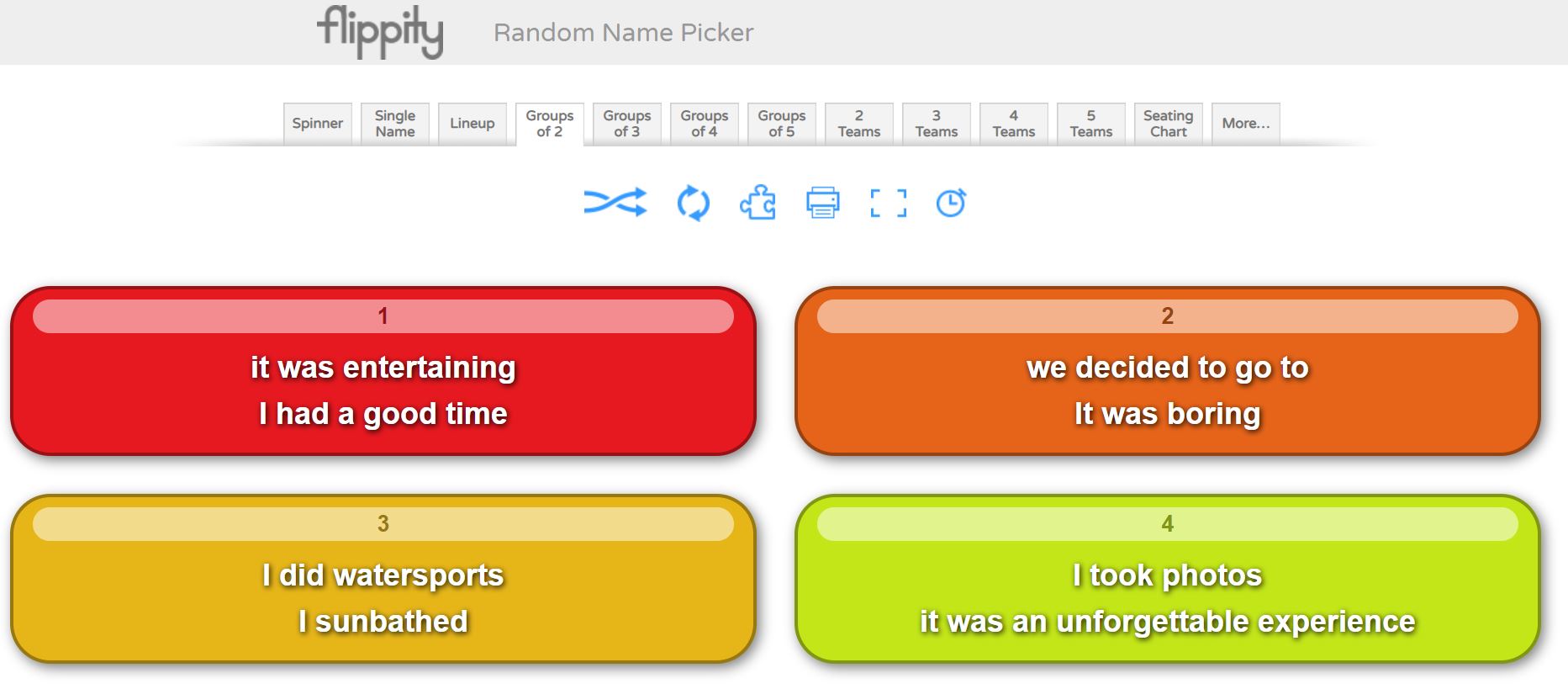
I have already talked about the Randomiser activity in Flippity. The  Random Name Picker activity is also very powerful if used with key vocab instead of names! You can choose, a spinner (similar to wheel of names) but also Group of two, three, four of five! These modalities create boxes with  two, three, four or five of the structures that you previously inserted. See example below.

As an initial activity, I ask students to write a long sentence using the structures within box 1. To make it more challenging, I ask students to write a paragraph using boxes 1, 2 and 3, in lessons they do this with mini whiteboards. This is a very powerful and fun activity which will test the creativity of students and will move them away from mere translation tasks. As homework, this is also a great task.


4. Writing short sentences and paragraphs via Quizizz

I love Quizizz! It allows me to create my own quizzes and tests for retrieval practice and to practise writing skills! 

The modalities of Fill in the blank, where sentences in English have to be translated into Spanish, with immediate feedback for students and Open Ended, are my favourite! For the Open Ended modality, I write a bullet point in the style of the 90 words GCSE writing exam, I set the quiz for 5 minutes maximum per question, and they write down a paragraph covering the bullet point showing in the question in that time. It looks like this from the student's point of view:


This type of activity is very powerful after carrying out mini whiteboards tasks, and a Fill in the blank quiz. I would expect students to recall information from memory only, to do this. Students know that for each bullet point, the quiz consists of a maximum of 5 bullet points, they need to cover the point, give a justification and an opinion and make reference two at least two tenses. This would have been practised endlessly in my model sentences. 

5. Writing pyramids 

This technique has been inspired by Gianfranco Conti. It can be carried orally or in writing. Students work in pairs with mini whiteboards. I give them two writing pyramids in English, A and B, starting with a structure at the top and finishing with a short paragraph at the bottom of the pyramid. See example below.


Each student also gets their partner’s Spanish version of the pyramid. Student A starts translating the pyramid in their mini whiteboard and student B makes sure it is correct, if a mistake is made, student A must stop and wipe their board. Student B has a go with their pyramid, then, and student A checks that no mistake is made. When a mistake is made, student A starts translating again. Every time a student takes a turn, they must start from the top! This reinforces key structures, grammar and use of accents!

6. Tangled Translations

Students translate a paragraph into Spanish but the original text will be partly in English, partly in Spanish! 

7.  One pen one dice

The classic translation game! Students work in pairs. Student A starts translating a given text while student B, using a digital dice these days, rolls a dice until they get a 6. When they get a , student A must stop translating and student B starts doing it while student A rolls the dice. I tend to do this activity for about 10 minutes for fun and after that I just tell the students they must work on their own and translate the text freely. My experience is that otherwise, pupils may get extremely frustrated and give up!

A link to a digital dice can be found here

I love Vincent Everett suggestion of using this activity for students to make short sentences from their Sentence Builders, orally or in writing. This way, students make as many sentences as possible from a given Sentence Builder sheet, until their partner gets a 6. 

8. Running Dictation

This is a fun dictation activity in pairs! Students work in pairs. Texts in Spanish are placed around the room. Student A runs to their text, reads it, tries to memorise the information and runs to student B to whom they dictate what they memorised. Student B writes the information down. At the end, students check their written version to that of the text. It provides a great model example which can lead to reading and grammatical analysis of the text. 

9. Dictogloss

This is another multi skill-activity, incorporating, listening, reading, speaking and writing. I like doing this activity with two texts A/B. In pairs, students first work through text A and then text B, which are very similar!

1. Student A reads text A and writes a summary in English. Student B reads text B and writes a summary in English too.

2. Student A, using their notes in English must translate the text into Spanish to their partner who listens and transcribes in target language.

3. Student B completes step 2 with Text B

4. Both students compare their transcription with the original texts.  

10. Battleships 

I create a battleships grid which we have previously worked with for listening and speaking. As a writing task, I give students 15 or 20 coordinates and students write the sentences corresponding to these.  B1, B5, C5 etc.. 

Again, an extremely easy and versatile activity which really reinforces the grammatical and vocabulary structures that I want students to focus on. For high ability students, I ask my pupils to extend the sentences.


11. Four boxes

I learned about this activity from FaceBook, sorry as I do not remember from whom, and I love it as it does not require any preparation. I display four boxes in my screen and ask students to translate a given sentence using their mini whiteboards, after all show their mini whiteboards I ask for a volunteer to read their sentence, if it is correct I write their name in one of the boxes. I repeat the process four times, so all four boxes are filled in with a name. The fifth time, the volunteer student needs to choose one name in the box to be kicked out so that their name can be written in box instead. After some time, say 20 minutes, the four names in the four boxes win!  Students love this game and become extremely competitive. It works even better orally!  I use it in conjunction with TaskMagic or Flippity Randomiser. Mind that you need to know your students well and the relationships in the groups must be good. If you have a digital timer that students do not see, it makes the experience unpredictable and more fun. Thanks Vincent Everett for the tip! 

12. Slalom/Translation writing activities 

Another Gianfranco Conti activity, which he suggested that I added to this repertoire and which I have used on some occasions too. The idea is to present students with a grid of chunks in English or Target Language, which they need to manipulate to create their own paragraphs. With low ability students I find it is best to give them a list of sentences or a short paragraph in English for them to translate by combining the different chunks. High ability sets love creating their own paragraphs or sentences, these students will also benefit from being encouraged to use other language, apart from that in the grid, which promotes language manipulation. 

13. Editing writing tasks

Another suggestion from Gianfranco Conti to this blogpost. It’s simple! Just provide a model writing task and ask students to edit it by changing key words, modifying the tense it is written on, making the writing better by writing reasons and opinions or adding extra tenses! It works well if students are presented with a list of sentences that they need to make into a whole paragraph. Great if it is done like a competition in a collaborative way in teams: which team can write the best paragraph based on these sentences? Students can share their writings using Padlet and learn from each other's answers. 

Writing Tasks with Checklists

When handing out a writing task, I always include a check list to help students in the writing process: use reasons, use opinions, use at least three tenses, use key high impact expressions, use vocabulary from past readings and listenings. 


Use of sentence builders and random vocab

These are great for writing and students should know them really well as all of my SBs are linked to a specific quizlet course! However, I also make students create their own quizlet set with random vocab found in listening and reading tasks, which they must learn! 

When carrying out writing tasks, I expect them to use their SBs but also at least three expressions from their own personal random Quizlet. This improves their use of language massively if required to do in all longer Writing tasks!

I also practise this random vocab in conjunction with flippity: create a sentence with box one and two expressions from your random quizlet course. This works really well with high ability students.

Creative and Collaborative writing: Project based tasks

Once students have practised the language in the controlled, production stage of learning, via many translations and small creative paragraphs, they should be ready to write on their own following some guidelines.  At this point, project based tasks to be carried out individually or collaboratively with partners can be very motivating. If these tasks are part of a project with students in another country via eTwinning you have a winner!  For these type of assignments I tend to use Padlet or Google Slides. These projects tend to be carried out towards the end of a topic and are common practice at KS3, unfortunately much more difficult to fit at GCSE level!

1. Y7 Art Project on Miró and Picasso

This project includes Writing and Oral tasks, as well as creating your own Miró styled work of art. For full details and materials for the project, visit my post, The power of Culture, here. Scroll down until you find the Y7 project. 

2. Y8 etwinning project 

Rutas Molonas, a project designed to write about student's own regions.  This is done with our partner schools in France and Spain. Information on the project, can be found in my post, The power of Culture, here. Scroll down until you find the Y8 project.

3. Y9 cinema project

So far we have studied Voces Inocentes but this year we are going to study Coco. We will dedicate the whole Easter term to study different topics through the film with the intention of creating a Coco Film online book display on the film. Watch this space, as I will dedicate a post to the project and all the materials used for its delivery.

4. Y10 exchange experience project

In Y9 and Y10 students are given the opportunity to participate in a exchange. As part of their experience, students, in conjunction with their partners in Spain need to create a blog diary, using Padlet, of their experience there. This is collaborative and creative writing tangled as one and the results can be awesome!

How to tackle the second writing task in the GCSE exam

To prepare my students for that second task, I do all the above activities but also in Y11, every two weeks, we do a Timed Writing Task. Students are presented with a Writing Task sheet, see below.

Writing Task two Titles for GCSE

Every two weeks, for homework, students must prepare a task from the list above, which I select. I start with writing tasks incorporating topics from Y10. Students prepare their writing and during our lesson they write 150 words in 40 minutes from memory, only having the two bullet points in front of them for support. I start this process, every year, after Half-Term in October and we continue it until study leave. It works wonders as we recycle all writing tasks. 

I mark these writings using the AQA GCSE mark scheme. I highlight careless mistakes, which they must correct or add to, if not enough opinions given for example, as part of a second homework. 

Make the link between the General Conversation in the Speaking exam and the Writing exam

If, as part of homework students need to practise their oral questions for the speaking exam, make the next writing linked to the same theme/topic as this oral task. There’s a clear link between both exams and students need to understand such link!

They must realise that by revising potential oral questions for the general conversation they are, in fact, learning potential content for the writing tasks. Understanding this link breaks down the gigantic task of preparing four separate exams and the GCSE preparation, becomes a more topic based exercise: same structures to be used in four different ways! Such concept is also reinforced by using multi skilled activities and the same type tasks to practise different skills, for example Battleships for listening, oral and writing. Students must understand that all skills are interwoven and must be practised interlinked with each other.


Saturday, 12 September 2020

Tackling Speaking from KS3 to the GCSE Exam!

On this post I am going to concentrate on the wonderful skill of Speaking. Everyone will agree that is the most important skill, together with listening, when we learn a language. You can get away without writing the language, even reading it (long passages anyway) but not without speaking it! 

Most importantly, students measure their language learning success against their oral ability and this tends to be low, which results in poor motivation and very low language uptake beyond GCSE, in the case of the UK. So, although not officially part of the GCSE exam this year, oral skills must not be forgotten in the current climate.

Speaking is perceived as difficult because it requires hours and hours of practice, which we just simply do not have in the curriculum. If we add to the equation a long syllabus content, we have a recipe for disaster, as students end up with cognitive load, meaning that there are not enough opportunities for students’ brains to embed the language and automatise it internally.

What’s the solution?

Creating real life experience opportunities where to use the language is important, as mentioned in two previous posts on the power of culture and the importance of providing extracurricular activities in the MFL curriculum. Similarly, teaching structures for  students to use the language during lesson activities is vital too, including vocabulary to interact with each other: it’s your turn! You are cheating! I do not understand etc.. When you hear students using this language praise them! Make speaking in the target language fun and worth doing it!

Similarly, at the same time, we need to structure and plan speaking tasks, highly linked to listening, in our classroom experience as much as possible, including spontaneity. When doing this, think small! Less is normally more! 

I tend to teach structures via Sentence Builders, I practise these, through listening and orally as much as possible in lessons and move to the next lot of structures: step by step, using retrieving practice in the process. I hardly do reading and writing activities in my lessons (unless they are part of short outbreaks of retrieval practice with mini whiteboards). I leave those tasks for homework. I use my lessons to provide as many listening and speaking opportunities as possible! These are some of my favourite classics!

Oral Battleships

A classic in my lessons. I do it as a listening but, mainly as an oral activity. The idea is simple: I write language on the top row (blue) and the first column (orange), which allows students to create different oral sentence combinations. Students tick 6/7 boxes (ships) and they need to try and guess where their partner’s ticks (ships) are by creating different combinations with the input on the row and column. See the example below.


I love battleships because it can be done at all levels and to practise ANY structure: 

1. Different grammatical persons on the top and different infinitives on the column (like the example above), with the aim to conjugate verbs in a given tense. This can be expanded to say a sentence with the conjugated verb!

1. Sentences in the present on the top row and in the past on the first column, with any other verb tense combinations, so students create sentences using two tenses.

Example here on Present and Past practice on Holidays

2. Nouns on the top and adjectives on the first column, to practise adjective agreement.

Example here with Animals and Colours (second page)

3. Expressions needing subjunctive on the top and verbs in infinitive in the first column which require the formation of the subjunctive.

Example here on Subjunctive and Environmental issues

4. Vincent Everett also proposes to fill in the squares in the Battleships with extra chunks for students to reproduce orally: top row I swim in the sea, side column but I wanted to sunbathe, middle square, because it was more fun. 

The possibilities are endless! To stretch able kids, I always ask students to extend their sentences with something they can think on the spot using high impact expressions, for example.

Information Gap Activities

Any type, any shape of these. Basically, any activity that requires students to get missing information from a partner or partners. Once structures haven been over practised through listening, reading and short, brisk translations, students can start practising the language themselves. This stage is still controlled production as I tend to specify in the activity what I want them to say: different SBs combinations! 

Example of Information gap activity based on questions and exchange of  information

Example of Information gap activity based on filling in an incomplete table, topic of health

My students love these activities because there is a real communicative purpose and they are achievable as they are based on the Sentence Builders practised in previous lessons. They also increase their confidence as I tend to use long paragraphs so there’s a sense of accomplishment.

Stealing Sentences

This idea is taken from the Gianfranco Conti repertoire. It’s uncomplicated and in its simplest form, it allows just reading: I usually display 7 sentences on the board, students choose 4 numbers at random which they write at the back of their books (I don’t give them pieces of papers anymore which they can physically steal because of COVID). Students move around the classroom reading the sentences to people. If the student they speak to has the number of the sentence they are reading, they are entitled to steal it: writing the number in their book, while the other student will have to cross it from their list. The person with most stolen numbers/ sentences wins! 

At a second stage, after10 minutes doing this I present the same sentences with gaps in them:


At a third stage, I show the English translations with the Spanish initials. At this point, students have been working with these sentences for nearly a whole lesson and can just reproduce them by heart! I make the sentences longer or shorter depending on ability!


As a follow up, students write the sentences and create their own ones.

Oral ping-pong

Another Gianfranco Conti classic. This is really a type of information gap activity. Students are given a sheet with a list of sentences in English. The sentences are the same in both cases but student A has the Spanish translation to the first half of the sentences while student B  has the other half. Students take turns, hence the Ping-Pong name, to translate orally the sentences they do not have the translation for.  Partners listen to their opponent and check the accuracy of oral translations using their sheet. If perfect, they award 2 points if there’s a mistake 1 point, more than 1 mistake, no points at all. When mistakes are made, students show the correct answer to their partners, creating really interesting metalinguitic discussions! 


Find someone who

I prepare pairs of cards, examples:

1. Find someone with the same names as you. On cards: María  Fernández, Luisa García. For Y7.

2. Find someone with two digits in their phone number the same as yours. On cards: 44 6422, 44 23 68. For Y7.

3. Find someone who plays this sport. On cards: Juego al fútbol. 

4. Find someone whose sentence combined with yours, makes sense.  Cards: ¿Vas a ir al cine mañana?, Sí, mañana voy a ir al cine porque ponen mi película favorita.  

5. You are spy. You have to find your fellow agent who has the same secret codeword as you. You have to drop this word or phrase (on card) into a normal conversation. Cards: los sábados me gusta desayunar salchichas. For Y11 and Alevel.

Speed Dating

Students are placed in two lines/ or two circles, one inside the other, facing each other. They must have a conversation with the person opposite to them. At the signal from the teacher, often a clap, the children from the outer circle or one of the lines, move towards the left, changing partners. They now perform the conversation again, at a second signal, students move to the left again (from the outer circle or one of the lines) and so and so on. I tend to do this outside, weather permitting! I also give them a list of questions to choose from, or prompts to formulate the questions themselves! Great for all levels but it is a fantastic way to practise the General Conversation questions for the GCSE oral exam. Also, I ask students to answer their questions, say in 3 minutes, but when they change partners to do it in 2 minutes and finally in 1 minute so they develop fluency! 

Dictogloss

This is a great activity that can be used to practise oral or writing skills! I present students with 2 texts, one for student A and one for student B, similar but not the same. Students do have time to read their won text in silence and take notes in English on it, not a literal translation. After 5/10 minutes, depending on the size of the text, students work in pairs: Student A will recreate their text, orally, using the notes they took in English, while student B will listen and will write in Spanish, not literally but the gist, what they understand from their partner! Student B does the same with student A. This activity is great because incorporates reading, listening, writing and speaking at once! Great for fluency! It can be repeated several times, but each time, you can ask students to be faster, hence, work on fluency, adopting the 3,2,1 strategy!

Spider Game

Teacher throws a wool ball to one student and asks a question. This student gets hold of some wool and throws the ball to another student while asking another question, the third student answers the question, keeps some of the wool thread and throws the ball to someone else and asks another question and so on. The idea is that students create a spider web with the wool every time they throw the ball. It is great for generating questions but difficult to carry out in a Covid environment.

Piedra, Papel, Tijera: evolución! (Stone, paper, scissors, evolution) 

I love this activity as it requires minimal preparation! The evolution part I heard it from Rachel Hawes. I put an open question on the board: talk about your holidays. Students play piedra, papel, tijera. Whoever wins needs to talk for a minute in the topic. If successful they move in the evolution chain. They evolve from egg, chick, bird, elephant to superman. Whoever gets to superman first wins! I have used this game with the GCSE photocard: students are given  series of photos and they talk about the photo for one minute when they win. Students can also ask each other questions in the card. 


Dice games in pairs or groups

There are lots of variations to this activity but basically, teacher prepares 6/12 key words on the board attached to numbers 1 to 6 or 2 to 12 if working with two sets of dice. Students work in pairs or groups by throwing the dice and saying a sentence with the key word which corresponds to the number in the dice. On the board, you can have question words, sentences to be translated and extended, key words to develop at Alevel etc... as dice cannot be used at the moment, I am still carrying out the activity using this digital version of dice. I share it with my students and they open the link on their own device: Interactive dice.

Board games

Any board game: snakes and ladders, connect four, trivial etc.. are great ways to practice oral: if students fall in a square they need to translate a sentence from a pack of cards, or create a sentence using a particular word, or create a sentence on a particular topic using a particular high impact expression. These can be in cards. I use these a lot to practise the GCSE general conversation exam. As boards cannot be used at the moment, I am using the interactive board games on Genially or from PowerPoint templates. 

Jenga Same as above but students need to do something before they can remove a piece of Jenga. Unfortunate I haven’t found an interactive version of this game yet!

Oral activities and IT tools

Wheel of names

I talk about this app on a previous post here. In the current climate, I share my Wheel of names activity link with students who can play from their own devices in pairs. This is a hit at the moment in my lessons! There are many activities to do:

  1. you can display key words and students need to create a sentence
  2. Students need to translate a sentence
  3. Students need to create questions
  4. Students need to talk for a minute on a given topic

PowerPoint Games

Check these lists of interactive game templates below to practise oral skills as a whole class  or individually! 

PowerPoint game templates

10 more PowerPoint games

Genially

You can use the templates within Genially to generate Boardgames to be played by groups of students together. 

Flipgrid

This is a great app for oral practice. I create a group for each of my classes and then threads on whatever I want them to give a presentation on. I use this at the last stage of the learning cycle: Spontaneity and free output from students! Great to practice the GCSE photocard and General Conversion questions. I love this app because I can create model answers to questions and provide feedback to students based on a predetermined mark scheme. Students can also see each other videos, although you can disable this feature, and learn from each other’s answers and, even better, contribute with an opinion to a certain video. This last option works best with Alevel students! Check Jane Basnett's blog for further ideas using Flipgrid!

Padlet

Great for oral practice too! You can insert a picture and students record themselves describing it and answering to the questions that come with it! As in the case of Flipgrid, this is great for a sharing culture in the classroom as all students can listen to each other’s inputs. Personally, I find that extremely empowering! 

Flippity

I love the Randomizer element of Flippity to practise oral skills. I enter the Sentence Builders in each box and students play the randomizer, and translate the sentences that appear.  As a follow up they must extend the actual sentence or doing the sentence in writing. 

HOW I TACKLE THE GCSE ORAL EXAM

Our department’s philosophy is NOT to teach for the exam but teach a skill which, if learned well, will allow students pass the exam. We do not start teaching exam style questions such as Roleplays and Photocards at KS3. Instead, we put oral skills at the core of our face to face lessons so students become confident speakers from day one in general. At a second stage, we, inevitably, prepare them for the GCSE exam, but not until they are actually doing their GCSE course.

This is the process I follow:

1. Oral activities, like the ones described above, are 100% embedded in all my lessons. Those activities which I have identified as good for GCSE are key to develop the skills the students will later need to tackle the oral exam.

2. After a topic is finished, I plan a couple of oral lessons where I go through Photocards and Roleplays. For this purpose we have an oral booklet with past Roleplays and Photocards to choose from. Activities such as Paper, Stone, Scissors are great for this! Also Flipgrid presentations for homework, where students need to prepare and talk about a photo from their booklet, including the surprise questions is good practice too.

Y10 oral booklet

3. Also for prep, students complete in writing, model answers for potential oral questions which they can use for the General Conversation, also available in their oral booklet.

4. We start a new topic but our oral assistant carries out one to one practice on either the general conversation questions or the photocard/roleplay.

5. I come back to step 1 but I always use retrieval practice to include in my oral/listening activities content from past topics.

6. Every 3 weeks during Y10 I plan oral an oral lesson where students practise the general conversation questions via Board Games or dice games. Our oral assistant keeps working with the students one to one during lessons.

7. In Y11 one lesson every other week is spent doing oral practice in pairs/groups: one lesson Roleplay and Photocard and another lesson just General Conversation questions. 

8. For prep they get to carry out, without help, mini presentations on Flipgrid on a given topic.

Writing model answers to questions for the General Conversation and practising these in pairs or individually via Flipgrid mini presentations is key! Students start reusing the same vocab/structures over and over again. This will not only be good for the oral per se, but also for the writing exam! In Y11 to reinforce this idea, every other week we dedicate a lesson to time writing based on a topic of the syllabus, in exam conditions. 

Finally, we aim to finish all the syllabus by the end of February in Y11. We conduct the oral exams after Easter. Therefore, we have around 7 weeks of teaching where each lesson (3 per week) is dedicated to one skill: oral, listening, writing/translation. Reading is done at home. To do this practice we use exam style questions via Exampro and Photocards, Roleplays from our oral booklet. 

During the oral lesson, at this stage, I, and the oral assistant, work with students one to one while they work in pairs, providing individual feedback.

Finally, the circle closes with extra practice, in pairs, during lunch time and after school. We make these sessions compulsory and I create a timetable where all students, in pairs, are given a 15 minute slot. We start this extra practice in February in Y11 up to their oral exam. 

This last strategy is a luxury, as we may not have time to do so a particular year because of school commitments etc.. but I always try to offer this practice at least a few weeks before the oral exam!

Whatever I do for the GCSE oral exam, the key is to embed oral skills in lessons as much as possible! So during Y10 and, especially Y11, I only need to focus on the actual exam structure not teaching students how to speak. 


Sunday, 23 August 2020

How Digital Tools can support Sentence Builders!

I love technology!  Not just for the sake of it but because I believe (based on my own experience) that it can enhance the teaching and most important, the learning experience of my students. 

I love blended learning and I think that digital resources can be crucial in retrieval practice, which is key for languages! If students are not continuously exposed to the language (our Sentence Builders), they will simple forget them! Similarly, digital tools help, along with cultural input, to make lessons memorable!  These are just some of my favourite platforms!

TaskMagic- Textivate

I have written extensively how these can be used at all different stages of the teaching/learning process according to the MARS EARS model: especially in the Model/ Awareness and Structured Production stages. Please see previous posts to see how I introduce/drill language using these tools.

Quizlet and Memrise

These are essential in making students independent and help them learn our SBs! Most students are used to using technology on their mobiles and, although the Repeating, Covering, Testing traditional learning method still has a place for many students, creating courses online linked to my Sentence Builders have proved to be a huge success!  I use Memrise for KS3, they love the competition points system, and Quizlet for KS4.

These are my Quizlet courses linked to my Sentence Builders (downdable from the Resources Page on this blog). 

All courses are shared with students via Firefly, our school digital platform and via Onenote. Students complete the courses for homework (learning tasks) and they get tested on them in lessons, formally or as a whole lesson activity. I think it is vital we give students learning tasks as homework! Let's face it, if we do not explicitly say they have to learn the vocab, most learners would not do it!

Wheel of names 

I love this simple app!  You can create roulette type of exercises for retrieval practice, again, based on our Sentence Builders.  Its use is ideal in the first two stages of learning but it can also be used in the last stage (Spontaneous stage) where students create a sentence from a given prompt. This technique, can be used up to KS5, very successfully. 

This is an example of a Wheel of names activity based on SB from the topic of Technology (Y10)  The activity can be done orally (testing after the Quizlet learning task) or in written with mini whiteboards. Able classes can be asked to extend the sentences with something that makes sense or/and using a different tense!  I can spend a whole lesson doing just Wheel of names activities! If you add and element of game (points system) you have a winner! 

Most nicely, you can have two or even three wheels opened on your screen! which means you can practise very long sentences! It would look like this: (Wheel 1 is about Sentences with IR and wheel 2 about reasons why)


Flippity

Fantastic app which I discovered thanks to Joe Dale. Similar use to Wheel of names but many more uses! Vincent Everett has many examples of how he uses the Randomizer tool with Sentence Builders, like the above example, without having to split your screen! Mike Elliott also has a great example of how to use the Randomizer in conjunction with Flipgrid! Below is Mike's video on how to do this to practise pronunciation with students on a given set of SBs. Once you create your activity, you just share the link with your students!

LearningApps

This must be my absolutely favourite app! which I have used for a few years now and has proved so handy during lock-down. It allows you to create many exercises based on the Sentence Builders that you are working on during lesson time. 

It also develops independence in learners and just adds a fun element to a conventional worksheet! It helps to make your lessons Memorable!

I particularly like the Freetext input activities, which allows me to create translation activities but also listening and dictation! Great for modelling the language! Example below: 

As in the case of Flippity, once you have your activity you just share it with your students! I do this via our class Onenote. 

Genially

This is the coolest app I discovered during lock-down thanks to Carmen Quirós. It is a presentation app but very engaging and interactive! I love the templates it provides to create info-graphics, board games and escape rooms!  You can get very creative with these Escape Rooms! 

Marie Allirot and Julia Morris have shared many impressive escape rooms using Genially, check them here.  However, using the templates as they are, is also highly innovative and engaging.  

I have created my own escape rooms, again, to practise in a different way those precious SBs so they are great for the structure production stage of learning. What I love about Genially, is that you can embed activities from LearningApps (or any other app) into your slides, making these activities part of the challenges to escape the room! This is Retrieval Practice and Gamification on the use of SBs at their best! 

Example of a Genially Escape Room for SBs practice

Example of a Genially Escape Room for oral spontaneous practice

Another cool use of Genially, is their board games templates!  These are just ace and students love them to practise their Sentence Builders or discussing KS5 topics!

Example of a Genially Boardgame

Mentimeter

Mentimeter allows you to create interactive presentations by letting your audience (your students) interact with you! I used it to test SBs too (2nd stage of learning) but also to get spontaneous responses from the students from a prompt. The teacher carries out the presentation with questions and students will get a code which they introduce in their own devices. Students answer those questions using their devices.  

All answers will appear on the screen! Great for collaboration, sharing good answers among students and quick feedback for the teacher (how many mistakes are there?/ checking for understanding). This tool proved great during lock-down too! See example below:

Padlet

This app is great to practise oral and writing collaborative work. I use it in the last stage of the learning process (spontaneous, extensive production) although it can also be used for Controlled Production. I love it because it is a collaborative space for students and they can learn from each other. It is eye-catching and again, it makes the learning more memorable than just using a classic worksheet!  

Another use for a Padlet is to share videos that students make! and for collaboration with partner schools.  This is our Erasmus journey, using Padlet, below.  I also use Padlet for revision schedules for my Y11 students. They love it!  This is an example. 

Flipgrid

This is a great app for oral practice. I create a group for each of my classes and then threads on whatever I want them to give a presentation on. I use this at the last stage of the learning cycle: Spontaneity and free output from students!


Whiteboard.fi

This app presents a great solution to the current climate. It offers a digital mini whiteboard. You just need to create a class and share a code with your students. Pupils from their own device will join your class with a board which will be displayed in the big screen, that way you can see each other answers, to say translations, verbs etc.. and everyone can see each other answers too on the the big screen/projector. Great to check for understanding, pinpoint areas of weaknesses, establish grammar discussions etc.. you name it! The big screen will look something like this:


Quizizz

This is a Quiz app but with a twist! It allows you to create different quizzes in different formats. Also, as part of your quiz input you can include listening (up to 10 seconds) which it makes it perfect for testing our SBs from a listening point of view! My favourite Quiz: Open-ended! so I can include dictations, translations, oral questions, you name it! Again, something very similar to Flippity, LearningApps but on a different formal so it is not boring from the students' point of view! The way I use it is not so much as a testing device but as Solo Practice mode. This way, I promote independence in my students.

Jane Basnett offers a fantastic overview on how Quizizz can be used for retrieval practice here.


Other digital resource I love with ready to use activities are:

The language gym extremely good for SBs practice and VERB TRAINER!!! the students love the competition element!  This is Gianfranco Conti's app! 

This is language great for listening videos! Again, my students can be come addicted to this.

Languagenut this offers listening, reading online activities

Lyric Gaps  to practise languages with pop songs.

Exampro AQA past paper questions to be created on specific themes, papers etc..

Linguascope good for younger learners 

To get a better flavour of these tools and others check my webinar below. As always, many thanks to TILT for conducting these free webinars!


For more TILT Webinar videos, which offer an amazing FREE CPD, check Joe Dale's Youtube channel here. 

Exploring Gemini Gems in Google Classroom: Study Partner

I hope everyone had a wonderful half-term break! In this post, I would like to share how you can create a Gem Assignment in Google Classroom...