Showing posts with label writing. Show all posts

Thursday, 20 February 2025

SOS: So after the Y11 mocks, what?

We just completed our second set of mock exams for Y11 before the February half-term and after analysing results, most students missed the next grade up just for two or three marks. This shows me that the next three of months will be key for my classes. How to maximise our time with our Y11 classes from now up to their exams to improve grades a grade or more?  I wrote a post on this topic in 2021 and my approach has not changed much!

This is my straight-forward line of action, which I have followed for many years, to make sure that students improve their Mock results for at least one grade.  In fact, although a SOS guideline, these are strategies we apply to all our KS4 lessons, including the new GCSE course. 

Maximising Listening skills

This is the skill our students tended to underperform in the trial and in the real GCSE exams, the wrongly called the passive skill!  Nevertheless, listening is the foundation of the learning journey to achieve fluency and get students using the language.  In our department we believe so strongly in the fundamental need to develop listening skills, linked to phonics, that we start tackling this skill at KS3 with a dedicated lesson every two weeks where students carry out listening personalised tasks, independently, with their headphones, in Google Classroom. I wrote extensively about listening at KS3, how to exploit textbook audio material and how to create a virtual language lab in this blog

Focussing on GCSE,  these are the strategies we adopt as from Y10:

  • We dedicate a lesson every two weeks, exclusively, to practise listening skills. We have three lessons per week so, one of those 6 lessons, in a fortnight, is exclusively a listening lesson. During that lesson, we prepare listening material + transcripts, based on the topics we teach in the curriculum and students carry the activities individually with their headphones.  
  • During the first lessons we do independent listening practice, we record ourselves and create classic activities such as "dictation with gaps" "putting sentences into order" "fill in the gaps without gaps" or "finishing the sentence", using 100% vocabulary that we have covered in lessons, so it is 95% understandable material, this is an example of a Y10 Independently Listening session. The idea is to treat listening for learning and retrieve vocab in a listening format.
  • As we carry out these lessons, and definitely at this stage of the GCSE course in Y11, we use mainly past paper listening questions,  for that use Exampro activities for AQA. Examwizard is the equivalent for Edexcel Pearson. We choose taskson a given theme/topic, so we concentrate on specific vocabulary at a time. When we create the tasks using Exampro, we use a variety of questions: Foundation, Overlapping and Higher. Students work with at their own pace individually, using headphones, so we also develop independent learning skills: Students learn how to revise for the listening exam, once they are at home. 
  • Use the transcripts wisely. Share them, with your students, at all times, but especially when carrying out exam style questions. We always include the transcripts and the mark schemes. Remember this is listening for learning not testing!  Use the transcripts to create pre-listening tasks, so there is an opportunity to look up vocabulary and do translation activities.  Ideally, this can be done in previous lessons, or as a homework task. During our listening independent lesson, students always listen to the audio while reading the transcript and then complete the task. Students work at their own pace and some may do only 2/3 tasks this way. On a second listening lesson, they can attempt some of the same tasks, again, interleaved with previous topic tasks, without  using the transcript, although this is always accessible to them. This is a powerful listening technique: Listening while reading the transcript. This practice has become more valuable now with the new GCSE and the reading aloud task, as this will provide excellent modelling practice for students for the reading aloud task, as well as developing their phonological recognition and develop listening processing skills.
  • At some point in the process, we also carry out an exam style question together: we look at the transcript first and highlight key vocabulary. We read the exam question and make sure we understand it, emphasising key words which may act as distractors in the exam: a sentence may start with something someone likes but later will say what they love, which is what is needed for the actual task. We pay attention to key, high frequency words that can be key for the listening exam, especially negatives and superlatives and opinion key words. We analyse why a particular question is challenging and what is key in the transcript to make it accessible: developing  metacognitive skills as we go through the thinking process of tackling a listening exam question.
  • We look up random vocabulary in transcripts and reading past papers: vocabulary that has appeared in previous years and we know we have not taught explicitly, and we create Quizlet courses. This is one of mine, I have two of these courses. Students learn this vocabulary over several homework tasks. It is amazing to see how some of the most random vocabulary keeps appearing in exams, year after year like: falta, ancianos, sopa de marisco, productos lácteos or me enteré/me decepcionó/ me di cuenta in AQA!
  • Students must add, any unknown vocabulary appearing in the transcript to their own random Quizlet courses: the more vocabulary they know, the better they will be at recognising it in a listening but also a reading task!
We keep doing this routine every two weeks, starting in Y10. During our normal lessons, we continue emphasising listening skills via Modelling activities such as Dictation, listening Battleships, Finishing the sentence, Spotting the listening mistake etc.. Over time, start mixing up topics and themes and set up listening tasks for homework too.  

Maximising Reading Skills

Students tend to do better in this skill. Learning  high frequency words and random general vocabulary, as done per listening, and all topic vocabulary is key for success! 

I normally tackle this skill via homework tasks, as I personally like using lesson time for oral/listening activities mainly. The use of Exampro or Examwizard can prove invaluable here too!

The key for success for this skill is to treat it, like the listening component, as an opportunity to learn the language!  So, students are encouraged to add any unknown vocabulary to their Random Vocabulary Quizlet, when carrying out the activities. In fact doing this is part of the homework task!

It is important that students don't see this practice as a test/assessment but as a learning opportunity!  Going through the reading tasks/answers with students and stop, to model, as a whole class, the thinking process to tackle those tricky questions, it is vital and super important. 

Don't just ask students to complete a task: reflect on the process of how students came to a particular answer and why it was not another. The exam is full of "catchy" bits, so training students to recognise these and look up for intensifiers, synonyms, negative words etc.. in a text are crucial skills!

Tackling  the Writing paper 

To get better at this, students need models of what a good writing task looks like and must know the structures/vocabulary/grammar extremely well! This is why using Sentence Builders throughout the GCSE course, not just at KS3, is so important: as these provide a wonderful framework to work with and manipulate the language as needed. 

All our Sentence Builders for GCSE can be found here . Of course, interleaving, retrieval practice and carrying out key activities throughout the GCSE course to help students learn these Sentence Builders and transfer them to their Long Term Memory, are essential.  To get ideas on Writing Tasks in general, as from KS3, visit this blogpost. 

  • Present students with a model of a writing task. This is my model video on how to tackle the 150 word question in AQA, modelling with students they thinking process they have to through when tackling a writing task question/bullet points.
  • We also dedicate a lesson every two weeks, to carry out a timed writing task in Y11, as we do with listening as from Y10.  For the tasks, again, we use Exampro past paper questions. We always prepare two tasks:  one aimed at Foundation level, including Description of a photocard, 40 words task a d 90 word task, and another at Higher level, 90 word task and 150 word task. Every two weeks, students for homework, prepare one of the tasks (Foundation or Higher), taking into account the 5 Magic Powers. 
  • To be successful in the previous task and to do also really well in the oral exam, especially the General Conversation, students need to fulfil certain criteria.  This is what I call the 5 Magical Powers:
    • Use of different tenses (at least three)
    • Giving opinions 
    • Giving Reasons
    • Talking about someone else, in its simple form, the use of reported speech mi madre/amigo dice/dijo que..
    • High Impact expressions
    We embed these Magical Powers in our SoW as from Y7! In fact our mark scheme at KS3 is based on how well these powers have been achieved in a written/oral task. Click here for a Blogpost on this. Looking at the new GCSE, still these criteria are present so it makes sense to get students familiar with them as from Y7! The idea is that when preparing their writing task for a timed writing lesson, they must make reference to these powers. 

    To help students to use the Magical Powers, we created the following document, with examples of the Powers to practise as from Y10. This document has been printed in A3, laminated and displayed in the students' desk.  Click here for a copy.  Students also have their own laminated copy for their bedrooms! 

    I have talked extensively about the Powers before, but one of the elements I developed recently is the use of LINKS or NUGGETS.  

    What are the NUGGETS?

    My Y11 students were really struggling with verb endings so I thought of using LINKS or NUGGETS, basically expressions acting as shortcuts,  which can be used for different tenses, without having to conjugate a verb.  I still expect most of my students to use verb endings but, if they struggle, in a moment of panic, the nuggets work wonders. Similarly, those students who can conjugate well and easily can alternate traditional conjugation with the NUGGETS, as these are also examples of High Impact expressions (a Magical Power), widening their use of vocabulary!


    How do they work? If students do not remember the endings for the present tense, especially for irregular verbs, they may use Suelo/Suele/ Me gusta/ Podemos/Se puede. In the Preterite, Decidí/empecé a, in the Imperfect, Solía, in the future Voy a and in the Conditional Me gustaríaThe NUGGETS or LINKS are very popular because once you use them, you just need to use the Infinitive after them!!

    They also help weaker students to understand that an infinitive can never be used without the support of a NUGGET or LINK.  When we practise sentences, for example, we always do it using a verb ending but also a LINK/NUGGET if it is possible.  This has helped my students a LOT to avoid grammatical mistakes regarding verb endings. 

    The nuggets or links work so well that these are introduced as from KS3, so they become a second nature for students when they reach KS4.
 During our Writing Timed lesson, students carry out their Foundation/Higher task in exam conditions, which will be marked by the teacher, using the AQA Mark Scheme, so we can give give students specific feedback.

This technique, has dramatically improved the writing grades of our students in exams. As a matter of fact, we start using Timed Writing lessons in Y11 as from October Half-term up to their Study leave.
  • We retrieve, constantly in lessons, the 5 Magic Powers that students need,  to get the highest grades in the writing and oral papers.
  • During lesson time, we carry out Translation activities in a game environment using MWBs.

Maximising Speaking skills 

As with the Writing skills, it is important to model how to tackle the different components of the Speaking exam. In the case of AQA, knowing how to do well in the Roleplay and the Photocard is essential, as these two components will provide 50% of the marks for the whole oral and they just require exam technique! To prepare students well for this, we created this Oral booklet, based on past paper Roleplays and Photocards, as well as, example oral questions. 
  • We try to spend as much lesson time as possible on oral skills and scaffolding activities leading to fluency. This is the only skill which is very difficult for students to master on their own! Similarly, it is the skill that will motivate them the most to study a language at GCSE and beyond!!! If they feel they cannot speak, they will give up on the subject. For that, you can use, some of the activities proposed on this blog, preferably from KS3.
  • Using the Oral Booklet, model and practise, first in writing using MWBs, the Roleplay and Photocards. In Y11, these present great starter activities for a lesson! After practising as a whole class with MWBs, Students can practise the tasks, easily, with their partners as the oral booklet has on one side the student card and on the other the teacher's version. 
  • To practise the General Conversation part of the exam, 50% of the whole speaking mark, we give them model questions which students can start preparing in flashcards, little by little as from Y10, as the course progresses. I make it clear they cannot learn by heart all these questions! but having them in writing, gives them some confidence for their own revision on what a good model answer looks like! We are also continuing with this practice with the current Y10 cohort in preparation for the new GCSE. On this occasion, the model questions will be in preparation for the conversation to take place after talking about two photocards in the last part of the oral paper and the questions that will be asked after the reading aloud task (AQA)

Make the link between the General Conversation in the Speaking exam and the Writing exam

  • We help students practise these questions via home work tasks and we connect the oral to the writing: for example, we link the next timed writing, as explained above, to the same theme/topic covered in a previous oral homework task. There’s a clear link between both exams and students need to understand such link!

    Students must realise that by revising potential oral questions for the general conversation they are, in fact, learning potential content for the writing tasks. Understanding this link breaks down the gigantic task of tackling four different exams for GCSE. Such concept is also reinforced by using multi skilled activities and the same type of tasks to practise different skills, for example Battleships for listening, oral and writing. Students must understand that all skills are interwoven and must be practised interlinked with each other. Using our 5 Magic Powers has certainly helped us with this link, as the powers are valid for both productive skills.

  • During lessons, dedicate time to practise the general conversation questions in a game format. This is an example with Flippity: students click on the randomiser, play, Piedra, Papel, Tijera and must answer a question as it spins. To make the task more challenging, ask them to include a high impact expression, from the second column, in their answer. We tend to do this in writing with MWBs too. It works wonders as it reinforces the link between the speaking and writing paper and gives confidence to students before tackling purely oral tasks.

  • We dedicate our lessons two weeks leading to the Mock and real MFL orals to just to practise oral skills. 

  • As with writing, we retrieve, during our lessons, key verbs in different tenses and high impact expressions: basically our 5 Magic Powers.

These techniques have made a big difference for me year after year and have helped my students maximise their grade! I hope it is useful for you. For a blog just on maximising Speaking and Writing skills at Y11, look at this blogpost.  I would be super happy to hear what other techniques you use which are successful for you and your students!

Saturday, 30 March 2024

Making instant Google Form Quizzes with AI to practise the productive Skills (GCSE ORAL/WRITING EXAMS)

Happy Easter everyone!  I thought I would share with you a short post on how to use AI to create Google Forms Quizzes in seconds, using the Chrome Extension Brisk Teaching, which you can download from the Chrome Web Store here.  I heard about this extension from Joe Dale, guru of all things technology and languages, and inspired by his brief, I thought of making it work to practise the productive skills of Writing and Speaking with my current Y11 students, once they are back from their Easter Break. 

Brisk Teaching is very intuitive and very easy to use. Once it is downloaded as an extension, make sure you pin it in your Google Task Bar. 

Brisk can create a wide range of tasks, based on any web text showing in your screen, this could be a website, a google doc, a google slide etc.. I have just explored the "Create" feature properly, but the extension also has a " Give Feedback"  feature which will create automatic feedback, after you give a rubric and/or what you want to focus on, on a given text.  This could be really useful when marking Y13 long essays or for History/English teachers. 


However, I just focussed on "Create". This is what I did after downloading the extension:

1. I opened a google doc where I had lots of sample of questions in Spanish and English to help students prepare for the oral exam.

2. I clicked on the brisk icon on my task bar and the extension opened up at the bottom of my screen, as the picture above.

3. I clicked on "create" and then "Quiz", which opened the following menu: 


4. I change the language to "in Spanish". This is great, as my text had questions in Spanish and English but the app, ignored all the English input and just focussed in the Spanish questions.

5. In the box "what should the quiz cover?" I pasted the questions from my document that I wanted the quiz to be based on, I started with those referring to Theme 1 in the AQA GCSE syllabus. 

6. I ignored the grade, and chose "long answer" instead of "Multiple choice", as well as "20 questions" (that is the maximum) from the following box. 

7. Brisk then, will ask you if you want your quiz in Google Forms or in  a Google Doc, this is useful if you just want to create a quiz for a worksheet. I chose Forms and that's it! 

Brisk created a 20 question quiz, based on the questions I had pasted, in Spanish for students to write a paragraph. I just have to share the Quiz with my students and look at the responses.  I carried the same process for Themes 2 and 3 and ended up with 3 quizzes covering potential questions for the forthcoming GCSE General Conversation oral exam. 

How can I see this working?

The whole process to make the three quizzes took me around 4 or 5 minutes so I saved a good hour of work.

I want to use the quizzes for my students to carry out as a self-testing mechanism, where they can open the form and write, without looking at any notes, anything they can on the given question.  Great to practise oral and writing skills. 

I am planning to go to Exampro, choose writing exam bullet points from the 90 words task and the 150 words task, save it to a Google Docs, and then use Brisk, to create a quiz based on the bullet points from different written tasks. 

As a teacher, I can see my students responses and spot common mistakes which I can then address as a class, either from a Grammatical point of view, or form: have they covered our 5 Magic Powers? I can also focus on individual feedback to specific students.

The extension will work brilliantly to make a reading comprehension interactive quiz, in seconds, on a given website for A level. In fact, Brisk can also rewrite the content of a website to make it more accessible, a little bit like Diffit, which is excellent in the case of original native articles to work in the MFL classroom.  

The "Give Feedback" feature as mentioned above, would be excellent to give feedback to students on something they have written in a google doc. Brisk even gives you statistics of the displayed text by telling you how long was spent writing it and how many pastes it had! so excellent to see if your students actually wrote an essay themselves or copied and pasted from different sources. 

Overall, I think this is a fantastic FREE extension that can really reduce our preparation teaching time massively.  Thanks, Joe!


Tuesday, 16 May 2023

Creative ways to practise writing, reading and translation skills: Google Earth

This week has been one of those weeks were more traditional activities and the latest cutting edge technology have merged to inspire me!  This morning I saw on Twitter a great writing game, shared by Erin Gray, called "Capture the flag"  to revise for the fast approaching GCSE writing exam. It goes like this: 

Divide your class in 6/8 teams. For the game you will need a set of coloured flags, say 12, per team.  Print your cards and stick them on the board, as shown by Erin on her twitter post picture: 


Give each team a list of typical GCSE questions/bullet points. Students, in teams, write a paragraph for each given question. Once their paragraph is written, they must come to the teacher who checks the paragraph for any mistakes and if correct, students are allowed to pick any flag belonging to any team from the board. If the paragraph is not correct, they must go back to their seats and correct it. 

At the end of the session, points are given to each coloured flag, (see picture below from Erin Gray posted on twitter) so the team with most points wins the game. As Erin points out, it is a mixture between a running translation activity and a group game with the add-on of practising writing skills!


I love the game as it is! Thank you, Erin. However, after attending the third webinar on Joe Dale's series on AI for MFL teachers, and being a BIG fan of Google Earth and Wheel of Names tasks, I was inspired to combine these two tools with Erin's concept into one activity. This is the result

Writing Quest around Barcelona using Google Earth and Wheel of Names

I created a project in Google Earth based on a Writing Quest around Barcelona. Inspired by Joe Dale, I used Chat GPT to suggest 10 famous landmarks in Barcelona and to provide me with a description of such places in Spanish at GCSE level. I added the places suggested by Chat GTP and their description information to my Google Earth project

Then, I went to Wheel of Names and created a wheel with the GCSE questions in relation to Theme 1 for AQA GCSE Spanish (it could have been any theme and I could have used Chat GPT to give me a suggestion of questions, but I had my own). I went back to my Google Earth project and added the link to my wheel of names, at the end of each landmark description. 


This is the result :  Google Earth Writing Quest around Barcelona 

It works like this:

1. Divide the class in 6/8 teams like the original Erin's game

2. Have the sets of coloured flags like Erin suggests, stuck on the board. One set per team.

2. Share the Google Earth link with students via Onenote or Google Classroom

3. Students in teams, you could this in pairs or threes too, open the Google Earth presentation, go to the different places and do two things: 

         a. Translate into English the description of the landmark they are seeing (Reading)

         b. Click on the Wheel of Names link, spin the wheel and write a big paragraph on the  selected question for Theme 1. They must do this without looking at notes. (Writing)

4. One member of the team must go to the teacher to check their writing is correct

5. If correct, like in Erin's game, they pick up a flag from the board from any other team. If mistakes are found, they must go back to their team and revise their paragraph.

6. They continue with the next landmark in the presentation.

I have included 10 landmarks, meaning, 10 translations and writing 10 paragraphs. The translations include nice, new vocabulary, which I will ask students/teams finishing early, to identify and add to their personalised Random Quizlets. 

The whole activity took me 10 minutes to design thanks to Chat GPT. The Wheel of Names can be reused in other retrieval practice tasks for self testing, either for writing or oral purposes. In fact I have a wheel of names for each AQA Theme for this purpose:

Wheel of names Sample Questions for Theme 1

Wheel of names Sample Questions for Theme 2

Wheel of names Sample Questions for Theme 3

The game, adding Google Earth Projects, adds a cultural important element: a virtual visit to Barcelona. If done periodically, you can show different cities where the target language is spoken! Students will need to speak in Spanish when talking among them: real purpose for the activity, which helps motivation!

I hope the idea is clear and thank you again, to Erin and Joe for their inspiration today!

Tuesday, 25 October 2022

5 Magic Powers for GCSE productivity and high grades

As a new GCSE is coming home soon, I am still thinking about the current one and what to do to make sure that students can and will manipulate the language, while scoring the highest grades in the productive skills of Writing and Speaking in the GCSE exam. 

In other words, how can we make sure that students use the vocabulary and structures they know to express opinions on any topic, spontaneously and fluently?  Uhmmm that's what the new GCSE is trying to sort out! I believe the current GCSE, already does that, but anyway... 

These are the techniques we use as from Y7, the beginning of the learning journey, to make sure students become spontaneous with the language and get the highest grades at GCSE in the process, a default nice outcome!

To do so, we introduce  5 magic powers as early as possible, from Y7, little by little!

The 5 magic powers, based on the GCSE AQA Mark Scheme, are:

  1. Using more than one tense
  2. Giving opinions
  3. Giving reasons 
  4. Reported Speech
  5. High impact expressions and Idioms

These powers are practised inside out, via retrieval practice, throughout KS3 so, when students start the official GCSE course in Y10, they are a second nature to them! 

Then as from Y10, the GCSE specific topic vocabulary is taught, but always subordinated to these 5 magic powers, whose use is needed to score the highest grade in Writing/Speaking at GCSE. Topical vocabulary is constantly revisited via Retrieval Practice and our Sentence Builders. We also work hard to make sure that as much vocabulary as possible from the different topics is recycled in new ones. This is a necessity to tackle the Writing Task 2 in the Higher Paper or the Translation exercise.

As a department, we decide the language we are going to include for each magic power, which will be used, over and over again, throughout the learning journey, by the teachers and students alike: via modelling listening and reading activities and structured practice, creative and, finally, fluency tasks, following a lexicogrammar approach to teaching and learning languages.

We also use the following strategies:

Planning Writing Frames

We use these when students attempt any writing task as from Y10. 

Remember that most of the expressions in the Magic Powers, have already been introduced and fully practised as from Y7! so now we have two more years to make sure these powers are even more embedded with the new GCSE topical vocabulary, which we simplify for the Writing and Speaking exams in our GCSE AQA Sentence Builder Booklet. 


Self-Evaluation and Marking Frames

To develop independence and metacognition in our students, we also try to develop evaluating skills in our learners. For that, once they have produced a written task, they will also use the following Green Sheet/Card to proof-read their work. 

It is very similar to the Planning Writing Frame, but the green card is meant to be a checking point  for the students to notice and avoid careless mistakes, all taken from the AQA mark scheme. Students are welcome to tick the boxes they think they have covered well. Students will get this card and their planning time frame, with every piece of writing they have to produce.

Teachers also use the green card to mark students' work. This saves lot of time for us and it makes it clear to the students what the expectations from the exam and the teachers are. We highlight in green what was great in a given piece of writing, and in pink what could be improved, according to the check list in the card, with a general comment, if applicable, written in the card. The good news is that most of the time this is not needed! 

We also tick the boxes, with a green pen, to make it visually clear, what students did include and could have included!  When a piece of writing is given back to students, they have some reflection time to look at their green card and make improvements, where applicable, while they have the opportunity to ask a friend or teacher if unsure about something. 


These 5 magical powers are reinstated in oral activities too! 

To develop automaticity, spontaneity and fluency, we use Flippity, with potential questions and expressions from this 5 magic powers. We don't want students to learn by heart answers, but, instead, to try to answer these questions with bits they can retrieve spontaneously, using the magic powers column. The answers will be different every time they practise the questions, although, some nice phrases will be learned for specific questions and this is fine! 

Of course, these 5 magic powers are practised via many other activities all the time! and of course, there has been a lot of thinking, as a department, about what expressions/ structures to teach as from Y7 to maximise the students' grades, for example, teaching SUELO + infinitive or Me gustaría que mi madre tuviera. Then in Y8 students will say Me gustaría que mi casa tuviera.

The approach, supported by our Sentence Builders and our repertoire of activities works!


Saturday, 30 January 2021

Teaching in Times of Covid: Minimising and controlling the use of Google Translate

I haver read a lot in social media about the use of Google Translate by students during online teaching and how its use is becoming a real issue for Reading and Writing tasks while teaching online. In fact, this is a problem that MFL teachers face even in normal lessons: many teachers conduct writing tasks in lessons and not as homework, to prevent their students from using Google Translate. In the case of Reading tasks, sharing a photo of a text, rather than the word document, makes it more difficult for students to paste that text in Google Translate, but what about writing?

WHY DO STUDENTS USE GOOGLE TRANSLATE?

In most cases students use it because they want to say things  beyond their ability/level. Over the years, I have made the mistake to set up as homework, an open ended task or project, which has become a catastrophe as students were not linguistically fully prepared for it, or it was far too abstract, so they turned to Google Translate, defeating the purpose of the task and hindering their linguistic ability!

 This turns to occur at KS3 and KS4. It seems that when students want to be creative and impress us they turn to Google Translate! How ironic! 

How did I deal with this issue? 

By modelling language and thinking, first, of the written/oral task or tasks I would like my students to be able to carry out by the end of a unit and start working backwards: planning the language, the structures and the activities which will prepare them to complete this open ended project or task. Asking students to write a fairy tale, poem, film script, film review, thoughts about lockdown, or a comic without careful planning the linguistic content that they will need to master, in order to complete the task, it is an invitation to Google Translate and a waste of time. This is particularly true, the lower the linguistic level in our students, say Y7-Y9.

WE CANNOT ASK STUDENTS TO WRITE CREATIVELY TOO EARLY IN THE LEARNING PROCESS, ONLY WHEN IT IS RIGHT!

HOW TO MINIMISE GOOGLE TRANSLATE USE

Firstly, I don't think we can prevent Google Translate use completely, unless we carry out writing tasks in lessons, which I think is a pity:  I like using lessons for interactive, collaborative activities and oral tasks as much as possible!  Unless doing Timed Writing with Y11s, a test, or collaborative writing in pairs/groups, I tend not to use lesson time for individual writing tasks.  

Once I have in my mind the final task or tasks that I want my students to be able to produce and I decide the language they will need to do so, I provide students with a wide range of scaffolds in their learning journey so that throughout lessons they embed and assimilate as much language as possible, which they can use and manipulate relatively confidently in an open task, so they do not feel the need to use Google Translate to be creative. 

How?

Firstly, through the use of Sentence Builders. Since I started using these three years ago, my students turn less and less to Google Translate. That is a fact.

I think of some final tasks, in relation to a topic, and I create a Sentence Builder to help students create such tasks at the end of a unit.  

I present the Sentence Builder content, in Covid Times, via a pre-recorded video, modelling pronunciation and asking students to repeat after me (they do record themselves using the Audio Insert feature in Onenote). Then, we would spend many lessons practising these Sentence Builders through listening, reading and translation activities.  

Currently, using spiral.ac allows me to carry out many of the listening activities I would do in normal lessons: Dictation, Delayed Dictation, Finish the sentence, Translation both ways, Manipulation of Sentence Builders to different tenses etc...

At a second stage, LearningApps, Textivate, Flippity, Wheel of Names, Quizizz, Carousel Learning, Genially and Deck Toys tasks, help me enormously to make students practise the structures I want them to master in order to become schemas of their long term memory!  This process, especially at the moment, can be lengthy!  That's why less is more! Only when I have evidence that students have pretty much assimilated our Sentence Builders, I would set a writing, creative task.  On a post on how digital tools can support Sentence Builders click here.

The task will be based on the Sentence Builder studied  and/or on previous ones, with elements of creativity, which would have been also rehearsed in the previous structured practise stage of learning. When given the task, students are encouraged to use their Sentence Builder as much as possible and they also have access to a grammar section in their Onenote, to make reference to different verb endings. It works! Most of my students DO NOT use Google Translate because they can use some set structures from memory, although spelling mistakes may occur, and have gone through a planned scaffolded learning process of the needed structures.  

Jumping to the creative stage of learning to early tends to lead to the use Google Translate.

DO I FORBID THE USE OF GOOGLE TRANSLATE?

No, I don't. I think that Google Translate, if used properly, is a fantastic resource!  I wish I had had something like that when I was learning English! 

My students are allowed to use Google Translate to say something that they genuinely cannot say and they really want to LEARN how to say it!  This MUST only be a few sentences, never a paragraph, and they must highlight it in their writing task. 

When I read their work, they are honest about Google Translate use. In many cases, although Google Translate is getting better, the given translation, especially if an idiom, is wrong! That is a powerful message for them!!! At that point I will write the right translation in their writing.

What do they do next?

All my students have a personal Random Quizlet for vocab they encounter in reading, listening, oral or writing tasks. When students read or listen to my feedback from a writing task, they are given time, or it is part of their next homework, to include their new, chosen Google sentence in their Random Quizlet and learn it as any other vocab. Doing this, gives them more chance to reuse the structure/ sentence they wanted desperately to say, gives them ownership of their learning and makes them proud!

Still, I have some students who abuse the system, but they are the small, small, minority, the vast majority do use Google Translate responsibly!


Sunday, 11 October 2020

Tackling Writing, the interwoven skill: from KS3 to the GCSE exam

On this post I am going to focus on the skill of writing and how to develop accuracy as well as content and rich language. All key elements of the GCSE writing mark scheme. 

Writing is even more important this year as the oral exam, as such, is not going to take place, so on its own, this skill will hold 33% of the total GCSE mark.

Writing is intrinsically linked to accuracy, use of grammar and translation skills. Writing can support oral skills beautifully, as the content is the same for both exams. This is even more the case in Spanish and German as they are phonetic languages, so both skills truly correlate. Writing is also core for retrieval practice and a key tool to memorise vocabulary in many students. In other words, writing is the interwoven skill which underpins many others!


Below you can find some of my favourite techniques to practise writing and tackle accuracy and rich vocabulary use as from Y7!

Writing as a stickability, learning tool!

Any structure or key vocabulary that we want our students to embed in their long term memory, can be practised via writing. After introducing Sentence Builders, doing listening and reading tasks, before moving to controlled production via oral activities, I always plan writing tasks to help my students memorise key structures. 

1. Writing short sentences with mini whiteboards via Dictations

This technique is great for modelling and extremely powerful to practise key structures from current and previous topics. It means modelling via listening and writing at its best! Dictations are also great to train students' brain to recognise the link between phonemes and graphemes. As a teacher, in its simplest form,  I dictate  a sentence in Spanish and students write it down using mini whiteboards. Delayed Dictation is great here too for memory retention! Dictation in pairs works great too. 

2.Writing short sentences with mini whiteboards via short translations.

Same as above but I say sentences in English, based on our SBs, and students translate them into Spanish. Students get immediate feedback and the activity can lead to meta linguistic discussions with students, which they love: why this verb must end in a and not ar? Why la gasolina es caro would be wrong? How would we say it makes us feel good if we know me hace sentir bien means it makes me feel good?

To make it more interactive, I use small incentives: every three correct translations students get a sticker. Students keep a tally in their Onenotes and 15 stickers equals an Alpha. (Our school reward system). 

To make the process even more fun, I use taskmagic flashcards with pre thought key sentences showing initials in Spanish for support for less able students. 


Also, wheel of names works fantastically well this way and adds to the unpredictability aspect. I spin the wheels and students need to translate the sentence that both wheels show in English.


The randomiser activity in Flippity is also an invaluable tool for this technique. I click on the lever and students translate, using their mini whiteboards, the combinations showing. Vincent Everett and Mike Elliot use the randomiser for reading and oral practice too, in combination with Flipgrid. 


After one lesson practising controlled writing in this way we move to controlled oral practice using the same sentences but now to be carried out orally, instead of using mini whiteboards. This helps tremendously with fluency! 

3. The Random Name Picker feature in Flippity 

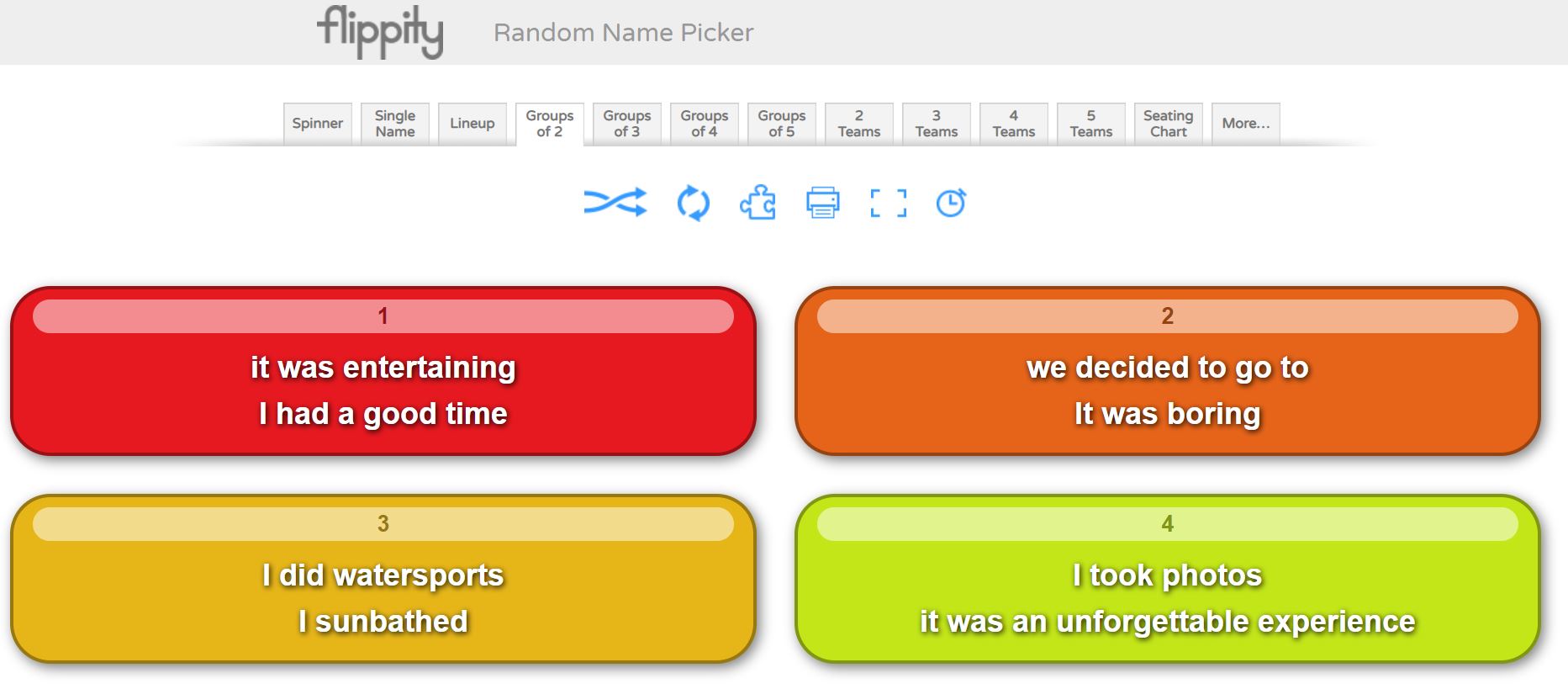
I have already talked about the Randomiser activity in Flippity. The  Random Name Picker activity is also very powerful if used with key vocab instead of names! You can choose, a spinner (similar to wheel of names) but also Group of two, three, four of five! These modalities create boxes with  two, three, four or five of the structures that you previously inserted. See example below.

As an initial activity, I ask students to write a long sentence using the structures within box 1. To make it more challenging, I ask students to write a paragraph using boxes 1, 2 and 3, in lessons they do this with mini whiteboards. This is a very powerful and fun activity which will test the creativity of students and will move them away from mere translation tasks. As homework, this is also a great task.


4. Writing short sentences and paragraphs via Quizizz

I love Quizizz! It allows me to create my own quizzes and tests for retrieval practice and to practise writing skills! 

The modalities of Fill in the blank, where sentences in English have to be translated into Spanish, with immediate feedback for students and Open Ended, are my favourite! For the Open Ended modality, I write a bullet point in the style of the 90 words GCSE writing exam, I set the quiz for 5 minutes maximum per question, and they write down a paragraph covering the bullet point showing in the question in that time. It looks like this from the student's point of view:


This type of activity is very powerful after carrying out mini whiteboards tasks, and a Fill in the blank quiz. I would expect students to recall information from memory only, to do this. Students know that for each bullet point, the quiz consists of a maximum of 5 bullet points, they need to cover the point, give a justification and an opinion and make reference two at least two tenses. This would have been practised endlessly in my model sentences. 

5. Writing pyramids 

This technique has been inspired by Gianfranco Conti. It can be carried orally or in writing. Students work in pairs with mini whiteboards. I give them two writing pyramids in English, A and B, starting with a structure at the top and finishing with a short paragraph at the bottom of the pyramid. See example below.


Each student also gets their partner’s Spanish version of the pyramid. Student A starts translating the pyramid in their mini whiteboard and student B makes sure it is correct, if a mistake is made, student A must stop and wipe their board. Student B has a go with their pyramid, then, and student A checks that no mistake is made. When a mistake is made, student A starts translating again. Every time a student takes a turn, they must start from the top! This reinforces key structures, grammar and use of accents!

6. Tangled Translations

Students translate a paragraph into Spanish but the original text will be partly in English, partly in Spanish! 

7.  One pen one dice

The classic translation game! Students work in pairs. Student A starts translating a given text while student B, using a digital dice these days, rolls a dice until they get a 6. When they get a , student A must stop translating and student B starts doing it while student A rolls the dice. I tend to do this activity for about 10 minutes for fun and after that I just tell the students they must work on their own and translate the text freely. My experience is that otherwise, pupils may get extremely frustrated and give up!

A link to a digital dice can be found here

I love Vincent Everett suggestion of using this activity for students to make short sentences from their Sentence Builders, orally or in writing. This way, students make as many sentences as possible from a given Sentence Builder sheet, until their partner gets a 6. 

8. Running Dictation

This is a fun dictation activity in pairs! Students work in pairs. Texts in Spanish are placed around the room. Student A runs to their text, reads it, tries to memorise the information and runs to student B to whom they dictate what they memorised. Student B writes the information down. At the end, students check their written version to that of the text. It provides a great model example which can lead to reading and grammatical analysis of the text. 

9. Dictogloss

This is another multi skill-activity, incorporating, listening, reading, speaking and writing. I like doing this activity with two texts A/B. In pairs, students first work through text A and then text B, which are very similar!

1. Student A reads text A and writes a summary in English. Student B reads text B and writes a summary in English too.

2. Student A, using their notes in English must translate the text into Spanish to their partner who listens and transcribes in target language.

3. Student B completes step 2 with Text B

4. Both students compare their transcription with the original texts.  

10. Battleships 

I create a battleships grid which we have previously worked with for listening and speaking. As a writing task, I give students 15 or 20 coordinates and students write the sentences corresponding to these.  B1, B5, C5 etc.. 

Again, an extremely easy and versatile activity which really reinforces the grammatical and vocabulary structures that I want students to focus on. For high ability students, I ask my pupils to extend the sentences.


11. Four boxes

I learned about this activity from FaceBook, sorry as I do not remember from whom, and I love it as it does not require any preparation. I display four boxes in my screen and ask students to translate a given sentence using their mini whiteboards, after all show their mini whiteboards I ask for a volunteer to read their sentence, if it is correct I write their name in one of the boxes. I repeat the process four times, so all four boxes are filled in with a name. The fifth time, the volunteer student needs to choose one name in the box to be kicked out so that their name can be written in box instead. After some time, say 20 minutes, the four names in the four boxes win!  Students love this game and become extremely competitive. It works even better orally!  I use it in conjunction with TaskMagic or Flippity Randomiser. Mind that you need to know your students well and the relationships in the groups must be good. If you have a digital timer that students do not see, it makes the experience unpredictable and more fun. Thanks Vincent Everett for the tip! 

12. Slalom/Translation writing activities 

Another Gianfranco Conti activity, which he suggested that I added to this repertoire and which I have used on some occasions too. The idea is to present students with a grid of chunks in English or Target Language, which they need to manipulate to create their own paragraphs. With low ability students I find it is best to give them a list of sentences or a short paragraph in English for them to translate by combining the different chunks. High ability sets love creating their own paragraphs or sentences, these students will also benefit from being encouraged to use other language, apart from that in the grid, which promotes language manipulation. 

13. Editing writing tasks

Another suggestion from Gianfranco Conti to this blogpost. It’s simple! Just provide a model writing task and ask students to edit it by changing key words, modifying the tense it is written on, making the writing better by writing reasons and opinions or adding extra tenses! It works well if students are presented with a list of sentences that they need to make into a whole paragraph. Great if it is done like a competition in a collaborative way in teams: which team can write the best paragraph based on these sentences? Students can share their writings using Padlet and learn from each other's answers. 

Writing Tasks with Checklists

When handing out a writing task, I always include a check list to help students in the writing process: use reasons, use opinions, use at least three tenses, use key high impact expressions, use vocabulary from past readings and listenings. 


Use of sentence builders and random vocab

These are great for writing and students should know them really well as all of my SBs are linked to a specific quizlet course! However, I also make students create their own quizlet set with random vocab found in listening and reading tasks, which they must learn! 

When carrying out writing tasks, I expect them to use their SBs but also at least three expressions from their own personal random Quizlet. This improves their use of language massively if required to do in all longer Writing tasks!

I also practise this random vocab in conjunction with flippity: create a sentence with box one and two expressions from your random quizlet course. This works really well with high ability students.

Creative and Collaborative writing: Project based tasks

Once students have practised the language in the controlled, production stage of learning, via many translations and small creative paragraphs, they should be ready to write on their own following some guidelines.  At this point, project based tasks to be carried out individually or collaboratively with partners can be very motivating. If these tasks are part of a project with students in another country via eTwinning you have a winner!  For these type of assignments I tend to use Padlet or Google Slides. These projects tend to be carried out towards the end of a topic and are common practice at KS3, unfortunately much more difficult to fit at GCSE level!

1. Y7 Art Project on Miró and Picasso

This project includes Writing and Oral tasks, as well as creating your own Miró styled work of art. For full details and materials for the project, visit my post, The power of Culture, here. Scroll down until you find the Y7 project. 

2. Y8 etwinning project 

Rutas Molonas, a project designed to write about student's own regions.  This is done with our partner schools in France and Spain. Information on the project, can be found in my post, The power of Culture, here. Scroll down until you find the Y8 project.

3. Y9 cinema project

So far we have studied Voces Inocentes but this year we are going to study Coco. We will dedicate the whole Easter term to study different topics through the film with the intention of creating a Coco Film online book display on the film. Watch this space, as I will dedicate a post to the project and all the materials used for its delivery.

4. Y10 exchange experience project

In Y9 and Y10 students are given the opportunity to participate in a exchange. As part of their experience, students, in conjunction with their partners in Spain need to create a blog diary, using Padlet, of their experience there. This is collaborative and creative writing tangled as one and the results can be awesome!

How to tackle the second writing task in the GCSE exam

To prepare my students for that second task, I do all the above activities but also in Y11, every two weeks, we do a Timed Writing Task. Students are presented with a Writing Task sheet, see below.

Writing Task two Titles for GCSE

Every two weeks, for homework, students must prepare a task from the list above, which I select. I start with writing tasks incorporating topics from Y10. Students prepare their writing and during our lesson they write 150 words in 40 minutes from memory, only having the two bullet points in front of them for support. I start this process, every year, after Half-Term in October and we continue it until study leave. It works wonders as we recycle all writing tasks. 

I mark these writings using the AQA GCSE mark scheme. I highlight careless mistakes, which they must correct or add to, if not enough opinions given for example, as part of a second homework. 

Make the link between the General Conversation in the Speaking exam and the Writing exam

If, as part of homework students need to practise their oral questions for the speaking exam, make the next writing linked to the same theme/topic as this oral task. There’s a clear link between both exams and students need to understand such link!

They must realise that by revising potential oral questions for the general conversation they are, in fact, learning potential content for the writing tasks. Understanding this link breaks down the gigantic task of preparing four separate exams and the GCSE preparation, becomes a more topic based exercise: same structures to be used in four different ways! Such concept is also reinforced by using multi skilled activities and the same type tasks to practise different skills, for example Battleships for listening, oral and writing. Students must understand that all skills are interwoven and must be practised interlinked with each other.


Exploring Gemini Gems in Google Classroom: Study Partner

I hope everyone had a wonderful half-term break! In this post, I would like to share how you can create a Gem Assignment in Google Classroom...