Showing posts with label TaskMagic. Show all posts

Saturday, 26 June 2021

Planning a "Blended" curriculum: Give students wings!

You all know how much I love technology in the classroom, not because it is a gimmick but because it genuinely spices up my teaching, saves me lots of time and most importantly, it is a great tool to practise key structures, in many different ways, which equals to lots of retrieval practice and stickability, in all the stages of the learning journey. Finally, it allows me to take languages outside the classroom and make my lessons accessible to my students once they leave the classroom, in other words, it can give students Super Powers or like the old Red Bull advert says, it gives my students wings!


However, for Digital tools to have a positive impact in our students' learning,  it is important to plan and make its use clear in the curriculum. In order to do that, as I mentioned in my previous blogpost on achieving Fluency, it is important to decide a platform to share with students and think backwards: What do we want our students to achieve by the end of each unit? How are we going to get there? and finally, which tools can we use at each stage of the process? 

This is the journey:


a these are some of the tools I use at each stage:

MODELLING STAGE

Spiral and Mentimeter

I use both tools as an alternative to Mini Whiteboards in the classroom: I do translations both ways, dictations, delayed dictation, finishing the sentence or write a sentence with the given word (great for retrieval practice). A tutorial video on how to use Spiral can be found here 

Screencasting 

Screencasting, I use Loom, your modelling activities, and upload them into your own very Youtube channel, is a great way to practise Modelling. Of course, I do modelling in face to face lessons with my students, however, I love the possibility of using my own Youtube videos as listenings, dictations and translation as homework tasks. This is a clear example of how technology allows you take your lesson outside the classroom! Modelling and listening/practise pronunciation has never been easier! This is an example video 

Bitmojis

Bitmojis are a great way to carry out modelling activities! I can make my Bitmoji talk and create multiple listening comprehension activities based on this: Fill in the gaps, Questions/Answer, full transcriptions etc.. I use PhotoSpeak on my iPhone to create the talking effect. Once the video is created and uploaded unto my Youtube channel, I can create a MS Forms task with it, add it to a LearningApps activity or just embed it into my OneNote with the activities I want my students to carry out. I love creating my own Speaking Bitmoji as a listening activity as I can speak faster, slower etc.. to meet the needs of my students.

For a post on how to use Bitmojis creatively in the classroom, visit this Blogpost.  with a tutorial from the amazing Joe Dale.  This is an example of my Bitmoji Speaking on Relationships for my Y10 class.


Ths site is amazing for Modelling!!! It was created by the talented Marting Lapworth, creator of TaskMagic and Textivate and it is based on Gianfranco Conti's MARS EARS type of activities with Sentence Builders. You can create your own activities or use the premium ones based on prepopulated Sentence Builders on the site. I use the site for face to face teaching with my students, but especially to help pupils memorise our Sentence Builders in a engaging way. For more information on this site, visit its Blog

AWARENESS-RISING AND CONTROLLED PRACTICE

Flippity

I love Flippity for fun drilling practice of my Sentence Builders with elements of Fluency as I demonstrate on this video tutorial  


I also use Flippity with Manipulatives and as a listening activity, you can even insert your Bitmoji video there too! Check out this example. Overall, it is a great way to have a Blended Learning experience!

LearningApps

One of my absolutely favourites! This tool will allow you to create many different type of online activities which will help students memorise those important Sentence Builders and practise the language in a controlled and fun way! Here there's a tutorial video on how to exploit this free tool in the classroom. 

All my LearningApps activities can be found here

Wheel of Names

Another of my classic activities for Blended Learning. I explain how I exploit and milk this tool in this Video Tutorial. 


Quizlet, Memrise, Blooket and Carousel Learning.

These vocab learning platforms are great tools to practise the language and help students memorise Sentence Builders. I use Memrise with KS3 and Quizlet with KS4. I always link each of my Sentence Builders to at least 3 Quizlet or Memrise courses with around 10 chunks in them. Carousel Learning is also a great way to practise translations and carry out Retrieval Practice. I love Blooket as it allows me to upload my Quizlet courses so, from one activity a get two interactive tasks!

Quizizz

A quiz tool which I maximise by asking students to produce long answers to oral questions before we carry out oral practice in class. A type of warming up task! I also use it as an alternative tool for listening practice. I explain how in this video Tutorial. 

SPONTANEITY/ROUTANISATION/AUTONOMY STAGE

Genially

Great for Escape Rooms and especially, BoardGames to practise open ended questions or specific structures. 

Tip: Plan in advance with your team how you can exploit Genially and divide the work by deciding, within your team, who could create which activities on different topics. I also love using Genially to practise Exam skills in a relaxed way, even with ALevels! An example can be found here. 

Deck Toys

Deck toys is the not so known app and it is fantastic!  I use it to create Scape Rooms with all levels, including Y13/Y11 and exam skills. I love it, because I can also include Quizlet courses here. For a blogpost on how to exploit Deck Toys use in the classroom, click here. 

All my DeckToys activities can be found here. 

Flipgrid

Great for oral presentations! I love this app as students can cover their face or even do screencasting. I also like the fact that I can enter some rubrics to mark their work. 

Padlet

Another classic! I use it for collaborative work but also to showcase what students can write about from memory at the end of the learning journey, so the whole class can see each other's entries and learn from each other. I also use Padlet as a revision guide at GCSE. A post on how to do that can be found here. 

Of course there are more tools!  This is just a summary of my favourite mainly FREE ones! This is language, The Language Gym, Textivate and Languagenut are also some of my favourite ones at the Practice Stage too. 

The key point is to plan, when designing the curriculum, how and where these tools could be used in the classroom to give students WINGS!

A presentation on these ideas, which I carried out for Languagenut can be found here 


Sunday, 11 October 2020

Tackling Writing, the interwoven skill: from KS3 to the GCSE exam

On this post I am going to focus on the skill of writing and how to develop accuracy as well as content and rich language. All key elements of the GCSE writing mark scheme. 

Writing is even more important this year as the oral exam, as such, is not going to take place, so on its own, this skill will hold 33% of the total GCSE mark.

Writing is intrinsically linked to accuracy, use of grammar and translation skills. Writing can support oral skills beautifully, as the content is the same for both exams. This is even more the case in Spanish and German as they are phonetic languages, so both skills truly correlate. Writing is also core for retrieval practice and a key tool to memorise vocabulary in many students. In other words, writing is the interwoven skill which underpins many others!


Below you can find some of my favourite techniques to practise writing and tackle accuracy and rich vocabulary use as from Y7!

Writing as a stickability, learning tool!

Any structure or key vocabulary that we want our students to embed in their long term memory, can be practised via writing. After introducing Sentence Builders, doing listening and reading tasks, before moving to controlled production via oral activities, I always plan writing tasks to help my students memorise key structures. 

1. Writing short sentences with mini whiteboards via Dictations

This technique is great for modelling and extremely powerful to practise key structures from current and previous topics. It means modelling via listening and writing at its best! Dictations are also great to train students' brain to recognise the link between phonemes and graphemes. As a teacher, in its simplest form,  I dictate  a sentence in Spanish and students write it down using mini whiteboards. Delayed Dictation is great here too for memory retention! Dictation in pairs works great too. 

2.Writing short sentences with mini whiteboards via short translations.

Same as above but I say sentences in English, based on our SBs, and students translate them into Spanish. Students get immediate feedback and the activity can lead to meta linguistic discussions with students, which they love: why this verb must end in a and not ar? Why la gasolina es caro would be wrong? How would we say it makes us feel good if we know me hace sentir bien means it makes me feel good?

To make it more interactive, I use small incentives: every three correct translations students get a sticker. Students keep a tally in their Onenotes and 15 stickers equals an Alpha. (Our school reward system). 

To make the process even more fun, I use taskmagic flashcards with pre thought key sentences showing initials in Spanish for support for less able students. 


Also, wheel of names works fantastically well this way and adds to the unpredictability aspect. I spin the wheels and students need to translate the sentence that both wheels show in English.


The randomiser activity in Flippity is also an invaluable tool for this technique. I click on the lever and students translate, using their mini whiteboards, the combinations showing. Vincent Everett and Mike Elliot use the randomiser for reading and oral practice too, in combination with Flipgrid. 


After one lesson practising controlled writing in this way we move to controlled oral practice using the same sentences but now to be carried out orally, instead of using mini whiteboards. This helps tremendously with fluency! 

3. The Random Name Picker feature in Flippity 

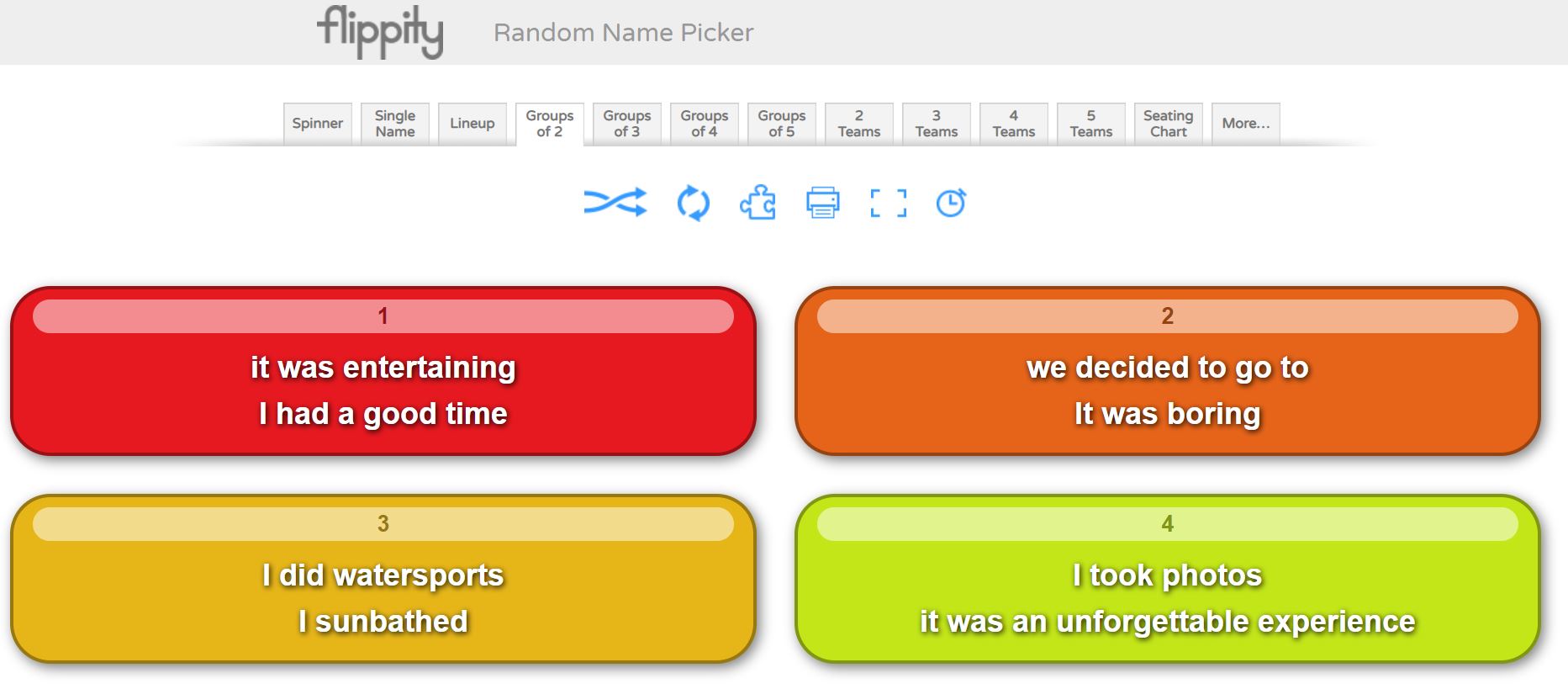
I have already talked about the Randomiser activity in Flippity. The  Random Name Picker activity is also very powerful if used with key vocab instead of names! You can choose, a spinner (similar to wheel of names) but also Group of two, three, four of five! These modalities create boxes with  two, three, four or five of the structures that you previously inserted. See example below.

As an initial activity, I ask students to write a long sentence using the structures within box 1. To make it more challenging, I ask students to write a paragraph using boxes 1, 2 and 3, in lessons they do this with mini whiteboards. This is a very powerful and fun activity which will test the creativity of students and will move them away from mere translation tasks. As homework, this is also a great task.


4. Writing short sentences and paragraphs via Quizizz

I love Quizizz! It allows me to create my own quizzes and tests for retrieval practice and to practise writing skills! 

The modalities of Fill in the blank, where sentences in English have to be translated into Spanish, with immediate feedback for students and Open Ended, are my favourite! For the Open Ended modality, I write a bullet point in the style of the 90 words GCSE writing exam, I set the quiz for 5 minutes maximum per question, and they write down a paragraph covering the bullet point showing in the question in that time. It looks like this from the student's point of view:


This type of activity is very powerful after carrying out mini whiteboards tasks, and a Fill in the blank quiz. I would expect students to recall information from memory only, to do this. Students know that for each bullet point, the quiz consists of a maximum of 5 bullet points, they need to cover the point, give a justification and an opinion and make reference two at least two tenses. This would have been practised endlessly in my model sentences. 

5. Writing pyramids 

This technique has been inspired by Gianfranco Conti. It can be carried orally or in writing. Students work in pairs with mini whiteboards. I give them two writing pyramids in English, A and B, starting with a structure at the top and finishing with a short paragraph at the bottom of the pyramid. See example below.


Each student also gets their partner’s Spanish version of the pyramid. Student A starts translating the pyramid in their mini whiteboard and student B makes sure it is correct, if a mistake is made, student A must stop and wipe their board. Student B has a go with their pyramid, then, and student A checks that no mistake is made. When a mistake is made, student A starts translating again. Every time a student takes a turn, they must start from the top! This reinforces key structures, grammar and use of accents!

6. Tangled Translations

Students translate a paragraph into Spanish but the original text will be partly in English, partly in Spanish! 

7.  One pen one dice

The classic translation game! Students work in pairs. Student A starts translating a given text while student B, using a digital dice these days, rolls a dice until they get a 6. When they get a , student A must stop translating and student B starts doing it while student A rolls the dice. I tend to do this activity for about 10 minutes for fun and after that I just tell the students they must work on their own and translate the text freely. My experience is that otherwise, pupils may get extremely frustrated and give up!

A link to a digital dice can be found here

I love Vincent Everett suggestion of using this activity for students to make short sentences from their Sentence Builders, orally or in writing. This way, students make as many sentences as possible from a given Sentence Builder sheet, until their partner gets a 6. 

8. Running Dictation

This is a fun dictation activity in pairs! Students work in pairs. Texts in Spanish are placed around the room. Student A runs to their text, reads it, tries to memorise the information and runs to student B to whom they dictate what they memorised. Student B writes the information down. At the end, students check their written version to that of the text. It provides a great model example which can lead to reading and grammatical analysis of the text. 

9. Dictogloss

This is another multi skill-activity, incorporating, listening, reading, speaking and writing. I like doing this activity with two texts A/B. In pairs, students first work through text A and then text B, which are very similar!

1. Student A reads text A and writes a summary in English. Student B reads text B and writes a summary in English too.

2. Student A, using their notes in English must translate the text into Spanish to their partner who listens and transcribes in target language.

3. Student B completes step 2 with Text B

4. Both students compare their transcription with the original texts.  

10. Battleships 

I create a battleships grid which we have previously worked with for listening and speaking. As a writing task, I give students 15 or 20 coordinates and students write the sentences corresponding to these.  B1, B5, C5 etc.. 

Again, an extremely easy and versatile activity which really reinforces the grammatical and vocabulary structures that I want students to focus on. For high ability students, I ask my pupils to extend the sentences.


11. Four boxes

I learned about this activity from FaceBook, sorry as I do not remember from whom, and I love it as it does not require any preparation. I display four boxes in my screen and ask students to translate a given sentence using their mini whiteboards, after all show their mini whiteboards I ask for a volunteer to read their sentence, if it is correct I write their name in one of the boxes. I repeat the process four times, so all four boxes are filled in with a name. The fifth time, the volunteer student needs to choose one name in the box to be kicked out so that their name can be written in box instead. After some time, say 20 minutes, the four names in the four boxes win!  Students love this game and become extremely competitive. It works even better orally!  I use it in conjunction with TaskMagic or Flippity Randomiser. Mind that you need to know your students well and the relationships in the groups must be good. If you have a digital timer that students do not see, it makes the experience unpredictable and more fun. Thanks Vincent Everett for the tip! 

12. Slalom/Translation writing activities 

Another Gianfranco Conti activity, which he suggested that I added to this repertoire and which I have used on some occasions too. The idea is to present students with a grid of chunks in English or Target Language, which they need to manipulate to create their own paragraphs. With low ability students I find it is best to give them a list of sentences or a short paragraph in English for them to translate by combining the different chunks. High ability sets love creating their own paragraphs or sentences, these students will also benefit from being encouraged to use other language, apart from that in the grid, which promotes language manipulation. 

13. Editing writing tasks

Another suggestion from Gianfranco Conti to this blogpost. It’s simple! Just provide a model writing task and ask students to edit it by changing key words, modifying the tense it is written on, making the writing better by writing reasons and opinions or adding extra tenses! It works well if students are presented with a list of sentences that they need to make into a whole paragraph. Great if it is done like a competition in a collaborative way in teams: which team can write the best paragraph based on these sentences? Students can share their writings using Padlet and learn from each other's answers. 

Writing Tasks with Checklists

When handing out a writing task, I always include a check list to help students in the writing process: use reasons, use opinions, use at least three tenses, use key high impact expressions, use vocabulary from past readings and listenings. 


Use of sentence builders and random vocab

These are great for writing and students should know them really well as all of my SBs are linked to a specific quizlet course! However, I also make students create their own quizlet set with random vocab found in listening and reading tasks, which they must learn! 

When carrying out writing tasks, I expect them to use their SBs but also at least three expressions from their own personal random Quizlet. This improves their use of language massively if required to do in all longer Writing tasks!

I also practise this random vocab in conjunction with flippity: create a sentence with box one and two expressions from your random quizlet course. This works really well with high ability students.

Creative and Collaborative writing: Project based tasks

Once students have practised the language in the controlled, production stage of learning, via many translations and small creative paragraphs, they should be ready to write on their own following some guidelines.  At this point, project based tasks to be carried out individually or collaboratively with partners can be very motivating. If these tasks are part of a project with students in another country via eTwinning you have a winner!  For these type of assignments I tend to use Padlet or Google Slides. These projects tend to be carried out towards the end of a topic and are common practice at KS3, unfortunately much more difficult to fit at GCSE level!

1. Y7 Art Project on Miró and Picasso

This project includes Writing and Oral tasks, as well as creating your own Miró styled work of art. For full details and materials for the project, visit my post, The power of Culture, here. Scroll down until you find the Y7 project. 

2. Y8 etwinning project 

Rutas Molonas, a project designed to write about student's own regions.  This is done with our partner schools in France and Spain. Information on the project, can be found in my post, The power of Culture, here. Scroll down until you find the Y8 project.

3. Y9 cinema project

So far we have studied Voces Inocentes but this year we are going to study Coco. We will dedicate the whole Easter term to study different topics through the film with the intention of creating a Coco Film online book display on the film. Watch this space, as I will dedicate a post to the project and all the materials used for its delivery.

4. Y10 exchange experience project

In Y9 and Y10 students are given the opportunity to participate in a exchange. As part of their experience, students, in conjunction with their partners in Spain need to create a blog diary, using Padlet, of their experience there. This is collaborative and creative writing tangled as one and the results can be awesome!

How to tackle the second writing task in the GCSE exam

To prepare my students for that second task, I do all the above activities but also in Y11, every two weeks, we do a Timed Writing Task. Students are presented with a Writing Task sheet, see below.

Writing Task two Titles for GCSE

Every two weeks, for homework, students must prepare a task from the list above, which I select. I start with writing tasks incorporating topics from Y10. Students prepare their writing and during our lesson they write 150 words in 40 minutes from memory, only having the two bullet points in front of them for support. I start this process, every year, after Half-Term in October and we continue it until study leave. It works wonders as we recycle all writing tasks. 

I mark these writings using the AQA GCSE mark scheme. I highlight careless mistakes, which they must correct or add to, if not enough opinions given for example, as part of a second homework. 

Make the link between the General Conversation in the Speaking exam and the Writing exam

If, as part of homework students need to practise their oral questions for the speaking exam, make the next writing linked to the same theme/topic as this oral task. There’s a clear link between both exams and students need to understand such link!

They must realise that by revising potential oral questions for the general conversation they are, in fact, learning potential content for the writing tasks. Understanding this link breaks down the gigantic task of preparing four separate exams and the GCSE preparation, becomes a more topic based exercise: same structures to be used in four different ways! Such concept is also reinforced by using multi skilled activities and the same type tasks to practise different skills, for example Battleships for listening, oral and writing. Students must understand that all skills are interwoven and must be practised interlinked with each other.


Sunday, 23 August 2020

How Digital Tools can support Sentence Builders!

I love technology!  Not just for the sake of it but because I believe (based on my own experience) that it can enhance the teaching and most important, the learning experience of my students. 

I love blended learning and I think that digital resources can be crucial in retrieval practice, which is key for languages! If students are not continuously exposed to the language (our Sentence Builders), they will simple forget them! Similarly, digital tools help, along with cultural input, to make lessons memorable!  These are just some of my favourite platforms!

TaskMagic- Textivate

I have written extensively how these can be used at all different stages of the teaching/learning process according to the MARS EARS model: especially in the Model/ Awareness and Structured Production stages. Please see previous posts to see how I introduce/drill language using these tools.

Quizlet and Memrise

These are essential in making students independent and help them learn our SBs! Most students are used to using technology on their mobiles and, although the Repeating, Covering, Testing traditional learning method still has a place for many students, creating courses online linked to my Sentence Builders have proved to be a huge success!  I use Memrise for KS3, they love the competition points system, and Quizlet for KS4.

These are my Quizlet courses linked to my Sentence Builders (downdable from the Resources Page on this blog). 

All courses are shared with students via Firefly, our school digital platform and via Onenote. Students complete the courses for homework (learning tasks) and they get tested on them in lessons, formally or as a whole lesson activity. I think it is vital we give students learning tasks as homework! Let's face it, if we do not explicitly say they have to learn the vocab, most learners would not do it!

Wheel of names 

I love this simple app!  You can create roulette type of exercises for retrieval practice, again, based on our Sentence Builders.  Its use is ideal in the first two stages of learning but it can also be used in the last stage (Spontaneous stage) where students create a sentence from a given prompt. This technique, can be used up to KS5, very successfully. 

This is an example of a Wheel of names activity based on SB from the topic of Technology (Y10)  The activity can be done orally (testing after the Quizlet learning task) or in written with mini whiteboards. Able classes can be asked to extend the sentences with something that makes sense or/and using a different tense!  I can spend a whole lesson doing just Wheel of names activities! If you add and element of game (points system) you have a winner! 

Most nicely, you can have two or even three wheels opened on your screen! which means you can practise very long sentences! It would look like this: (Wheel 1 is about Sentences with IR and wheel 2 about reasons why)


Flippity

Fantastic app which I discovered thanks to Joe Dale. Similar use to Wheel of names but many more uses! Vincent Everett has many examples of how he uses the Randomizer tool with Sentence Builders, like the above example, without having to split your screen! Mike Elliott also has a great example of how to use the Randomizer in conjunction with Flipgrid! Below is Mike's video on how to do this to practise pronunciation with students on a given set of SBs. Once you create your activity, you just share the link with your students!

LearningApps

This must be my absolutely favourite app! which I have used for a few years now and has proved so handy during lock-down. It allows you to create many exercises based on the Sentence Builders that you are working on during lesson time. 

It also develops independence in learners and just adds a fun element to a conventional worksheet! It helps to make your lessons Memorable!

I particularly like the Freetext input activities, which allows me to create translation activities but also listening and dictation! Great for modelling the language! Example below: 

As in the case of Flippity, once you have your activity you just share it with your students! I do this via our class Onenote. 

Genially

This is the coolest app I discovered during lock-down thanks to Carmen Quirós. It is a presentation app but very engaging and interactive! I love the templates it provides to create info-graphics, board games and escape rooms!  You can get very creative with these Escape Rooms! 

Marie Allirot and Julia Morris have shared many impressive escape rooms using Genially, check them here.  However, using the templates as they are, is also highly innovative and engaging.  

I have created my own escape rooms, again, to practise in a different way those precious SBs so they are great for the structure production stage of learning. What I love about Genially, is that you can embed activities from LearningApps (or any other app) into your slides, making these activities part of the challenges to escape the room! This is Retrieval Practice and Gamification on the use of SBs at their best! 

Example of a Genially Escape Room for SBs practice

Example of a Genially Escape Room for oral spontaneous practice

Another cool use of Genially, is their board games templates!  These are just ace and students love them to practise their Sentence Builders or discussing KS5 topics!

Example of a Genially Boardgame

Mentimeter

Mentimeter allows you to create interactive presentations by letting your audience (your students) interact with you! I used it to test SBs too (2nd stage of learning) but also to get spontaneous responses from the students from a prompt. The teacher carries out the presentation with questions and students will get a code which they introduce in their own devices. Students answer those questions using their devices.  

All answers will appear on the screen! Great for collaboration, sharing good answers among students and quick feedback for the teacher (how many mistakes are there?/ checking for understanding). This tool proved great during lock-down too! See example below:

Padlet

This app is great to practise oral and writing collaborative work. I use it in the last stage of the learning process (spontaneous, extensive production) although it can also be used for Controlled Production. I love it because it is a collaborative space for students and they can learn from each other. It is eye-catching and again, it makes the learning more memorable than just using a classic worksheet!  

Another use for a Padlet is to share videos that students make! and for collaboration with partner schools.  This is our Erasmus journey, using Padlet, below.  I also use Padlet for revision schedules for my Y11 students. They love it!  This is an example. 

Flipgrid

This is a great app for oral practice. I create a group for each of my classes and then threads on whatever I want them to give a presentation on. I use this at the last stage of the learning cycle: Spontaneity and free output from students!


Whiteboard.fi

This app presents a great solution to the current climate. It offers a digital mini whiteboard. You just need to create a class and share a code with your students. Pupils from their own device will join your class with a board which will be displayed in the big screen, that way you can see each other answers, to say translations, verbs etc.. and everyone can see each other answers too on the the big screen/projector. Great to check for understanding, pinpoint areas of weaknesses, establish grammar discussions etc.. you name it! The big screen will look something like this:


Quizizz

This is a Quiz app but with a twist! It allows you to create different quizzes in different formats. Also, as part of your quiz input you can include listening (up to 10 seconds) which it makes it perfect for testing our SBs from a listening point of view! My favourite Quiz: Open-ended! so I can include dictations, translations, oral questions, you name it! Again, something very similar to Flippity, LearningApps but on a different formal so it is not boring from the students' point of view! The way I use it is not so much as a testing device but as Solo Practice mode. This way, I promote independence in my students.

Jane Basnett offers a fantastic overview on how Quizizz can be used for retrieval practice here.


Other digital resource I love with ready to use activities are:

The language gym extremely good for SBs practice and VERB TRAINER!!! the students love the competition element!  This is Gianfranco Conti's app! 

This is language great for listening videos! Again, my students can be come addicted to this.

Languagenut this offers listening, reading online activities

Lyric Gaps  to practise languages with pop songs.

Exampro AQA past paper questions to be created on specific themes, papers etc..

Linguascope good for younger learners 

To get a better flavour of these tools and others check my webinar below. As always, many thanks to TILT for conducting these free webinars!


For more TILT Webinar videos, which offer an amazing FREE CPD, check Joe Dale's Youtube channel here. 

Saturday, 18 July 2020

Retrieval Practice and TaskMagic

I wanted to spend some time talking about the potential of TaskMagic, an old but timeless tool which seems to have disappeared from the MFL classroom.  For me it is a classic! After the introduction stage of Sentence Builders, it is paramount for me to plan retrieval practice in lessons. In fact, my starter activity, which sometimes is not a starter as it can last as much as twenty minutes if needed, is to revise the language introduced/practised in my previous lesson.  For that purpose, TaskMagic is ideal! 


TaskMagic is an IT tool that can be bought as a whole School licence for £350 +VAT.  I think it is value for money!  Once bought it can be installed in all school computers as a standalone purchase. 
There are many activities that can be created with this wonderful piece of software. My favourite is Text Match for retrieval Practice.
In the Create Mode, I insert sentences based on our Sentence Builders in English in one column and their initials in Spanish in the second column.


When the file is open in the Play mode, I have a wide range of activities at my disposal for Retrieval Practice and worksheets! I use the activities as whole class tasks in our IWB. My favourite is Flashcards. 


I use the Flashcards activity in conjunction with mini whiteboards or orally: students translate the different sentences using the initials as support.  This can also be done, very quickly orally once students have memorised our SBs.  Students can also extend the display sentence with something that makes sense using a different tense. The sentences can also be an opportunity to talk about grammar, revise verb endings etc.. (metalanguage). With high ability groups, I display first the initials and then the English (developing thinking skills).

I love TaskMagic and I use this tool all the way to KS5: I display key vocabulary, structures that students need to use in a long sentence on a given topic. I display sentence starters that students need to finish using the subjunctive or any given structure. I use single words that act as a springboard to think about other words within the topic, antonyms, synonyms, word families.  

I love TaskMagic in the classroom because it takes 5 minutes to create tasks and I can squeeze hours of activities!  I also use the Worksheets for homework and self-quizzing, again another way to put retrieval into practice.  TaskMagic works amazingly if planned well and interleaving vocabulary from past topics! 

Grid Match is great for Verbs and whole class games!  

I delivered a TILT workshop a few years ago on innovative uses of TaskMagic and I created this Booklet with all the activities I normally generate with this tool. 

The developer of TaskMagic, Martin Lapworth, has also developed Textivate.  Textivate is similar to TaskMagic but an online/subscription tool. It is also great! and you can use it in the same way as TaskMagic.

Click on this video to see the differences between Flashcards in TaskMagic and Textivate

I find both tools excellent apps for retrieval practice for the classroom.  Textivate would be better for individual practice.  Both tools complement Quizlet, Memrise and Quizziz perfectly!  I will talk more about these other apps and retrieval practice in a different entry.  Many schools have TaskMagic in their shelves and it has been forgotten!  Shake the dust and use it!

Creating a language lab for KS3 students without a language lab room: INDEPENDENT LISTENING PRACTICE

Tomorrow, 1st June,  the last 6-7 weeks of the summer term start. This year, my trust has implemented a new system where the September timet...